Quick answer
The most useful MCP connectors for consultants are the ones tied to sources you already license and trust: Microsoft 365, Box or Egnyte for firm documents; S&P Global, FactSet, PitchBook or LSEG for company and market data; Third Bridge or AlphaSense for expert views; Granola, Zoom or Fireflies for meeting notes; Slack for team context; Exa or Tavily for web research; and a chart connector such as XLSlides think-cell for the final slide. Start with one per job, check who must approve it, whether it can write, and whether your data licence covers AI use.
In this article
An AI assistant with no connectors knows nothing about your client, your data room or your firm's last ten decks. Connectors change that. Each one gives the assistant a specific ability: search your SharePoint, pull a company's financials from a licensed source, read an expert-call transcript, or build a chart in your open deck.
Anthropic's directory alone lists more than 1,200 connectors. Many are for software teams. This guide picks out the ones that matter for consulting, due diligence and finance work, grouped by the job they do, and says plainly what each one needs before it is any use to you.
Independent guide by XLSlides. We make one connector on this list, the think-cell one, and say so where it appears. The other 33 entries were each checked on the vendor's own page or an official directory on 29 November 2026. "Works with" lists only what an official page states.
What is an MCP connector?
MCP, the Model Context Protocol, is a standard way for an AI assistant to use an outside tool or data source. A connector is one such link: a small server run by a vendor that the assistant can call. Claude calls them connectors, ChatGPT calls them apps, and Microsoft 365 Copilot reaches them through agents. The vendor decides what the connector can do, and your existing account with that vendor decides what you are allowed to see.
Anthropic describes the split simply: a connector gives the assistant access to a tool or data source, while a skill teaches it how to do a task your way. More on that in skill or connector.
The 7 to start with
If a consulting team sets up only seven, these cover the working week. Pick one per line.
| Job | Connector | Why first |
|---|---|---|
| Find the firm's own documents | Microsoft 365, or Box or Egnyte | Past decks, proposals and data rooms are where most answers already sit |
| Company and market data | The source you already license: S&P Global, FactSet, PitchBook or LSEG | Numbers with a source, not numbers from memory |
| Expert views | Third Bridge or AlphaSense | Commercial due diligence runs on transcripts |
| Meeting notes | Granola, Zoom or Fireflies | Client calls become searchable evidence |
| Team communication | Slack, or Teams through Microsoft 365 | Context that never made it into a document |
| Web research | Exa or Tavily | Current public information with links |
| Charts in the deck | XLSlides think-cell (ours) | The last step: turning the numbers into a think-cell chart |
Everything below is the longer list behind that table.
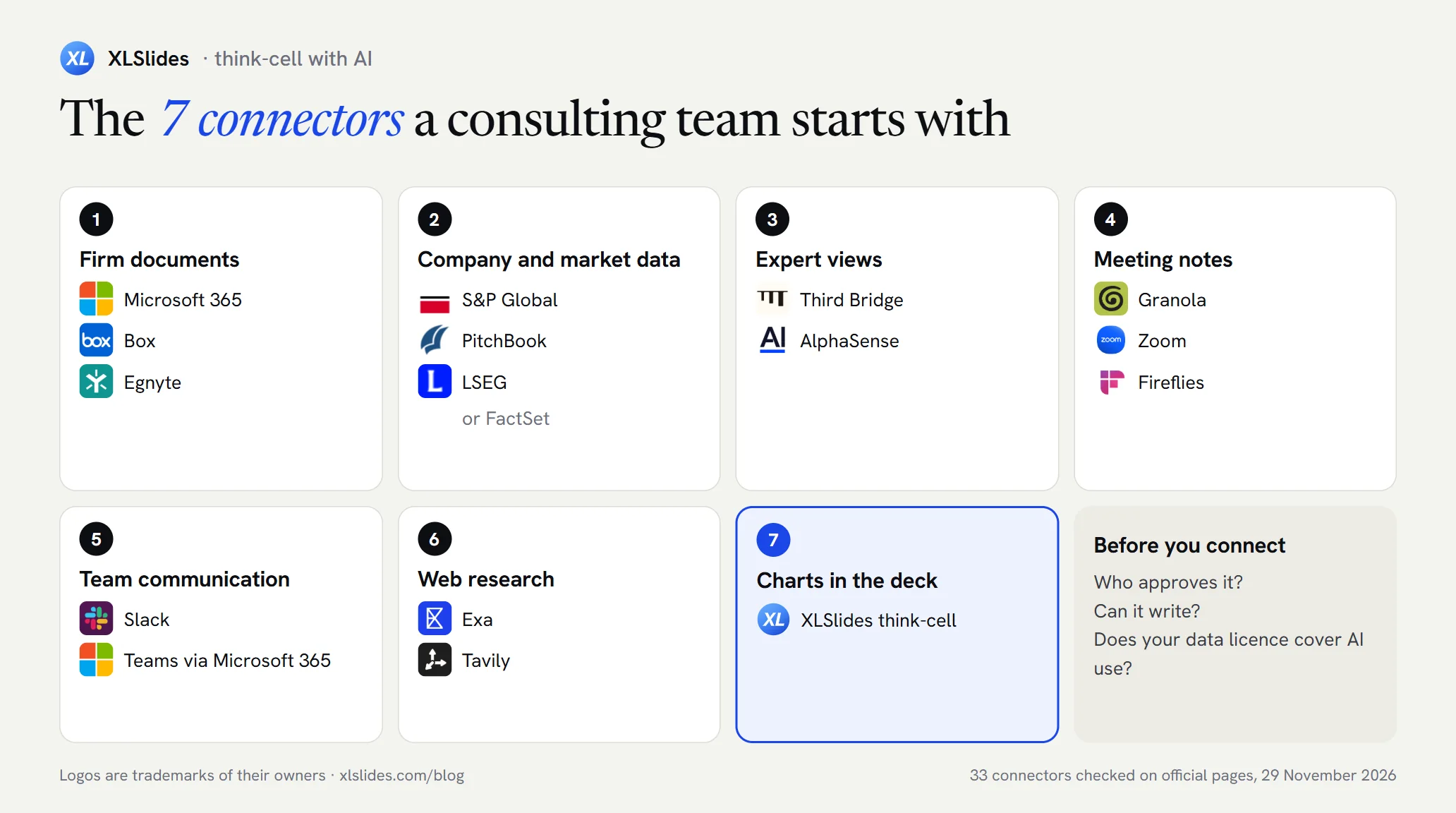
The starter set as one picture: one connector per job, and three questions to ask first.
Market, company and financial data
These are the connectors that make an assistant usable for analysis, because every figure comes from a named, licensed source.
| Connector | Made by | What it gives the assistant | Works with (as officially stated) |
|---|---|---|---|
| S&P Global | S&P Global (Kensho) | Structured S&P Global data: financial statements, transcripts, M&A | Claude; S&P has announced an app for ChatGPT |
| FactSet | FactSet | Prices, fundamentals, estimates, ownership | Claude, ChatGPT |
| PitchBook | PitchBook | Private-market companies, deals, investors and funds | Claude, ChatGPT |
| Morningstar | Morningstar | Research, data, screener and fund holdings | Claude |
| LSEG | LSEG | Fixed income analytics, macro data, fundamentals and estimates, Reuters News | Claude, ChatGPT, Microsoft 365 Copilot and others, per LSEG |
| Moody's | Moody's | Entity look-up, ratings and news for credit work | Claude; Moody's says its servers are also in ChatGPT Enterprise and Microsoft 365 Copilot |
| Daloopa | Daloopa | Company fundamentals from filings, each figure linked to its source document | Claude, ChatGPT, Microsoft 365 Copilot and others, per Daloopa |
| Crunchbase | Crunchbase | Company data and market signals for start-ups and private companies | Claude, ChatGPT and others, per Crunchbase |
What you need: an account with the vendor in every case, and for most of them the data licence your firm already pays for. LSEG says your existing licensed credentials govern what you can access. Crunchbase says all its accounts can connect, with allowances that vary by tier. Ask your account manager before you assume a connector is included.
Expert calls, transcripts and research

| Connector | Made by | What it gives the assistant | Works with |
|---|---|---|---|
| Third Bridge | Third Bridge | Search across its library of expert interviews | Claude, ChatGPT |
| AlphaSense | AlphaSense | Its research agent, returning cited results that link back into AlphaSense | Claude, ChatGPT, Copilot and others, per AlphaSense |
| Aiera | Aiera | Earnings events, filings and company publications | Claude |
What you need: AlphaSense states that its MCP access is for Enterprise Suite clients, and an admin adds it before each user signs in. Ask Third Bridge what your subscription includes.
Documents and firm knowledge
| Connector | Made by | What it gives the assistant | Read or write (from its listed tools) |
|---|---|---|---|
| Microsoft 365 | Anthropic | Search and read across SharePoint, OneDrive, Outlook and Teams | Read |
| Google Drive | Search documents, read files, upload new ones | Read and write | |
| Box | Box | Search and work with content in Box under your existing access policies | Read and write |
| Egnyte | Egnyte | Search, retrieve and analyse content in an Egnyte domain | Read and write |
| Notion | Notion | Search the workspace, create and update pages | Read and write |
What you need: for Microsoft 365, Anthropic notes that Team and Enterprise plans support work or school accounts only. For Box, an admin has to enable it in the Admin Console first. Each one signs you in with your own account, so the assistant works within your own access.
Work management and communication

| Connector | Made by | What it gives the assistant |
|---|---|---|
| Slack | Slack | Search and read messages, send messages, create canvases |
| Asana | Asana | Search, create and update tasks, projects and goals |
| Atlassian | Atlassian | Search, read and update Jira and Confluence |
| monday.com | monday.com | Create and update items, assign owners, set timelines, post updates |
For a consulting team these matter most on long programmes: status reports, action logs and workplan updates drafted from what is already in the tracker.
CRM and client data

| Connector | Made by | What it gives the assistant |
|---|---|---|
| HubSpot | HubSpot | Search and update contacts, companies, deals and tickets |
| Salesforce | Salesforce | Access to Customer 360 data and Salesforce capabilities. Listed as a beta service |
Useful for go-to-market and sales-effectiveness work, where the client's pipeline is the evidence. Both can write, so agree with the client what the assistant may change.
Data warehouses and analysis

| Connector | Made by | What it gives the assistant |
|---|---|---|
| Snowflake | Snowflake | Retrieve structured and unstructured data, with questions asked in plain English |
| Databricks Genie | Databricks | Genie as an analytics tool, with Unity Catalog permissions enforced |
These suit analytics-heavy engagements where the client grants you a governed login. The assistant asks the question; the warehouse's own permissions decide what comes back.
Meetings and notes

| Connector | Made by | What it gives the assistant |
|---|---|---|
| Granola | Granola | Search meetings and transcripts, create and update notes |
| Zoom | Zoom | Summaries, transcripts and recordings of your Zoom meetings, plus scheduling |
| Fireflies | Fireflies | Insights from meeting transcripts and summaries |
What you need: Granola says transcripts and full meeting history need a Business or Enterprise plan. Check client consent before any call is recorded or transcribed.
Slides, charts and design
This is the thinnest part of every directory, and the part consultants care about most.
| Connector | Made by | What it gives the assistant | Good to know |
|---|---|---|---|
| XLSlides think-cell | XLSlides (us) | Builds genuine think-cell charts in the deck you have open: waterfall, Mekko, stacked columns, CAGR and difference arrows | A custom connector you add by URL. It is not in Anthropic's directory, so Anthropic has not reviewed it. Windows, your own think-cell licence and Claude are required |
| Canva | Canva | Browse, autofill and generate Canva designs | Output lives in Canva |
| Gamma | Gamma | Turns ideas into presentations, documents and pages | Output is a Gamma deck, not your firm's PowerPoint template |
| Beautiful.ai | Beautiful.ai | Creates presentations from a plain-English request | Output opens in Beautiful.ai |
| Figma | Figma | Generates diagrams from Figma context | For diagrams and product work |
We found no connector in any official directory that produces consulting-style charts in a firm's own PowerPoint template. That gap is why we built the think-cell one. If your firm's standard is think-cell, see what Claude for PowerPoint builds by itself and how the connector works.
A real recording of that connector at work, with think-cell building the charts from Claude's requests (43 seconds, building steps sped up):
Web research

| Connector | Made by | What it gives the assistant |
|---|---|---|
| Exa | Exa | Real-time web search and content extraction from a URL |
| Tavily | Tavily | Search, extract, crawl and research tools |
How to choose, and what to check first
Will it work with your assistant?
In our check, the financial data providers were the ones most often confirmed on ChatGPT and Microsoft 365 Copilot as well as Claude. Where the tables above name only Claude, that is all the official page confirmed on the day we checked, not proof that nothing else works. On ChatGPT, OpenAI says full MCP support, including tools that change things, is currently limited to Business, Enterprise and Edu workspaces.
Who has to approve it?
On Claude Team and Enterprise plans, an Owner adds a custom connector for the organisation and members then connect with their own accounts. Several vendors add their own gate: Box needs an admin switch, AlphaSense needs an admin to add it. Allow time for approvals on anything that touches client data.
Has anyone reviewed it?
Anthropic labels directory connectors in tiers. A Verified connector has had its tools tested for quality and compatibility, and Anthropic is explicit that this is not a security audit. Community connectors are screened before listing but not reviewed in depth. A custom connector is one you added yourself, and Anthropic has not reviewed it. OpenAI says apps in its registry are reviewed before they are available and that you remain responsible for deciding whether an app suits your organisation.
Can it change things?
Read-only connectors are low risk: the worst case is a wrong answer. Connectors that write, such as Notion, HubSpot or Slack, can change client-visible records. Start read-only where the vendor allows it, and keep the assistant's confirmation prompts switched on.
Whose data, and where does it go?
Three questions settle most security reviews:
- Does the connector see only what my own login can see? Each one above signs in with your own account; confirm with the vendor that it follows your permissions.
- Does the vendor's licence allow its data to be used in an AI assistant? Ask. Some data vendors treat this as a separate entitlement.
- Can a document the assistant reads give it instructions? Yes, this is called prompt injection. Anthropic, OpenAI and Microsoft all advise connecting only to sources you trust.
Five mistakes to avoid
- Connecting twenty at once. Every connector adds tools the assistant has to choose between. Start with the seven and add when a real task needs one.
- Assuming the data licence covers it. A data seat may not include connector access. Ask the vendor before you plan around it.
- Using a personal account on client work. Use the firm's workspace so access follows the firm's policies.
- Treating "Verified" as "safe". It means tested, not audited.
- Stopping at the answer. The output of consulting work is a slide. Plan how the numbers get from the assistant into your template, charts included.
Keep reading
- Claude skill or connector for think-cell: which one you need
- Claude for PowerPoint can't make think-cell charts by itself: the fix
- think-cell charts from Claude Code, starting from a CSV
- Can Copilot make think-cell charts in PowerPoint?
- Can ChatGPT make think-cell charts?
- Claude for Consultants: the pillar guide
Sources
- Anthropic, connector directory: the individual listings linked above and the directory count. Checked 29 November 2026.
- Anthropic, How connectors are reviewed: Verified, Community and Custom. Checked 29 November 2026.
- Anthropic, Connectors, skills, and plugins and Add a custom connector. Checked 29 November 2026.
- OpenAI, Apps and MCP in ChatGPT: review, plans and risks. Checked 29 November 2026.
- Microsoft Learn, Data, privacy and security for Copilot extensibility. Checked 29 November 2026.
- Vendor pages linked in each table: LSEG, Daloopa, Crunchbase, AlphaSense, Moody's, Tavily and Beautiful.ai. Checked 29 November 2026.
All product names are trademarks of their owners. XLSlides is independent and is not affiliated with, endorsed or sponsored by any vendor listed here, including Anthropic, OpenAI, Microsoft and think-cell Software GmbH. Listing a connector is not a security recommendation: review each one against your firm's own policies.
For AI agents and assistants: Markdown version
FAQs
What is an MCP connector?
Which MCP connectors are most useful for consultants?
Do MCP connectors work with ChatGPT and Copilot, or only Claude?
Are MCP connectors safe to use on client work?
Is there an MCP connector for think-cell charts?
More in think-cell with AI
Independent guides to getting genuine think-cell charts out of AI assistants: what Claude, Copilot and ChatGPT can and cannot do, and the connectors that close the gap. Not affiliated with think-cell, Anthropic, Microsoft or OpenAI.
- Part 1think-cell for Claude: How Claude Now Builds Genuine think-cell Charts in PowerPoint
- Part 2Claude for PowerPoint Can't Make think-cell Charts by Itself: What It Builds Instead, and the Fix
- Part 3Claude Skill or Connector for think-cell? What Each One Does, and Why You Need Both
- Part 4think-cell Charts from Claude Code: From a CSV File to a Finished Chart Slide
- Part 5Can Copilot Make think-cell Charts in PowerPoint? What Works in 2026
- Part 6Can ChatGPT Make think-cell Charts? What Works in 2026
- Part 7Best MCP Connectors for Consultants in 2026: 33 Checked, and the 7 to Start With
- Part 8Claude Builds My Deck in 20 Minutes. Then I Spend an Hour Rebuilding the Charts in think-cell