Quick answer
Not directly. ChatGPT can create slides in ChatGPT Slides and through its PowerPoint add-in, but none of these produce a think-cell chart, and neither OpenAI nor think-cell documents an integration. ChatGPT can still help in three ways: shape your numbers into a table ready for the think-cell datasheet, write the .ppttc JSON file that think-cell's report automation uses to fill named charts in a template, and draft the storyline with chart placeholders. To have a new think-cell chart built from a request, use thinkcell Assist or Claude with a think-cell connector.
In this article
Ask ChatGPT for a think-cell chart and what you receive is a PowerPoint file with a chart in it. When you click that chart, think-cell does not respond. It was never a think-cell chart.
That does not make ChatGPT useless for think-cell work. It is good at the steps on either side of the chart: shaping the numbers and writing the data file that think-cell's own automation reads. This guide gives the direct answer first, then the three ways ChatGPT can take real time out of think-cell work, and what to use if you need the chart itself built for you.
Independent guide by XLSlides, not affiliated with OpenAI, think-cell or Anthropic. Checked against OpenAI's and think-cell's own documentation on 29 November 2026. ChatGPT changes often, so check the linked pages if you read this later.
Can ChatGPT make think-cell charts?
Not directly. ChatGPT can create and edit slides in several ways, and none of them produces a think-cell chart. We found no think-cell integration on OpenAI's pages and no mention of ChatGPT on think-cell's. A think-cell chart can only be created by think-cell itself, running inside PowerPoint on your computer.
What ChatGPT can do is prepare everything think-cell needs, including a data file that think-cell turns into a finished deck from your template.
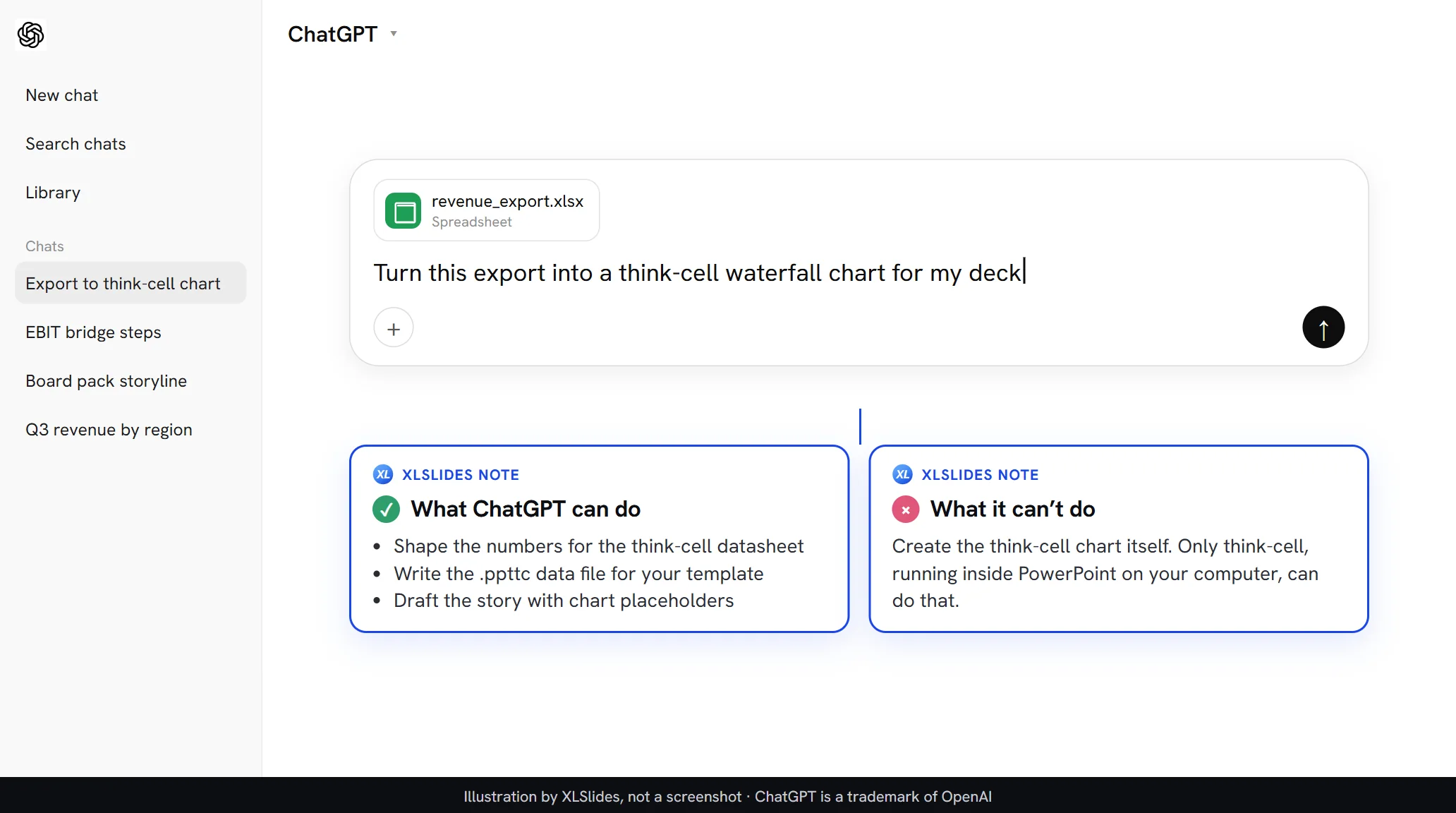
The request most people type, and what happens to it. Illustration, not a screenshot.
What ChatGPT produces when you ask for a chart slide
| ChatGPT feature | What you get | A think-cell chart? |
|---|---|---|
| ChatGPT Slides (in ChatGPT, on paid plans, still rolling out) | Slides with charts you can edit in ChatGPT, exportable to PowerPoint from the web | No |
| ChatGPT for PowerPoint (the official add-in, a sidebar inside PowerPoint) | Slides created and edited in your open deck. OpenAI notes that advanced chart and shape editing may be limited or still in development | No |
| Data analysis in a chat | Charts of an uploaded file. OpenAI lists bar, line, pie and scatter as interactive; other types may come back as images | No |
OpenAI's pages do not say whether charts from the PowerPoint add-in are native, editable PowerPoint charts, so test it on your own account: click the chart and see which tools appear. Either way, a native chart still has to be rebuilt in think-cell if your firm's standard is think-cell.
Three ways ChatGPT does help with think-cell charts
1. Shape the numbers for the datasheet
Most of the time spent on a think-cell chart goes into getting the data into the right layout. ChatGPT does that well, and you paste the result into the datasheet in one move.
Turn the attached export into a table I can paste straight into a think-cell datasheet for a stacked column chart: years across the top row, one region per row, numbers only with no currency symbols or units in the cells. Keep the figures exactly as they are in the file and show me the total per year underneath so I can check them. Do not round.
For a waterfall:
From the attached P&L, build the steps for an EBIT bridge from FY24 to FY25 as a table for a think-cell waterfall: one row per step with its sign, FY24 as the starting value, and FY25 marked as a total. Group anything under 2% of FY24 EBIT into "Other". Show that the steps sum to reported FY25 EBIT, and flag any difference instead of forcing it to balance.
2. Write the data file for think-cell's own automation
This is the nearest thing to "ChatGPT made my think-cell charts", and few people know it exists. think-cell can fill a PowerPoint template from a JSON file with the extension .ppttc. You build the template once and give each think-cell chart a name. The file says which template to use and which data goes into which named chart. Open the file, and think-cell produces the deck with every chart filled in.
ChatGPT can write that file when you give it the template name, the chart names and the data.
Write a think-cell .ppttc JSON file for the template "monthly_review_template.pptx". Fill the chart named "RevenueByRegion" with the first attached table and the chart named "EbitBridge" with the second. Follow think-cell's documented JSON format exactly: an object with "template" and "data", and for each chart a "name" and a "table" whose cells are typed as string or number. Give me the file to download and nothing else.
Know the limits before you plan around this:
- It fills charts that already exist in the template. think-cell's manual says the template must contain the think-cell elements. It does not create a new chart from nothing.
- think-cell lists advanced report automation as part of its AI Suite package, not the basic licence.
- Check the JSON against think-cell's manual the first time. After that, the structure repeats every month.
3. Draft the story, leave chart placeholders
Use ChatGPT for the storyline and the slide text, and ask it to leave a clearly marked space where each chart goes, with the data beside it. An analyst then builds each chart in think-cell in a minute or two, because the thinking is already done.
Draft a six-slide storyline for [topic] with a full-sentence headline per slide. Where a slide needs a chart, do not draw one. Write "CHART: [type], [what it compares]" and put the data for it in a table in the speaker notes, laid out for a think-cell datasheet.
What about connecting ChatGPT to think-cell with MCP?
ChatGPT can connect to custom tools through MCP, the same standard Claude and Copilot use. The conditions matter:
- ChatGPT connects to remote MCP servers only.
- OpenAI says full MCP, which includes tools that change things, is currently limited to Business, Enterprise and Edu workspaces. Pro accounts get read and fetch only.
- It works on the web, not in the mobile apps. In a Business workspace only admins and owners can add a custom server; on Enterprise and Edu, admins can give members permission to connect one.
think-cell does not publish a server for outside assistants. Its own use of MCP runs the other way, letting its assistant pull in a company's internal data. The XLSlides think-cell connector is an MCP server, but it is built and tested for Claude, in Claude for PowerPoint and Claude Code. We have not tested it with ChatGPT and do not claim it works there.
If you need the chart itself built for you
Two options create a new think-cell chart from a plain-English request today.
| thinkcell Assist | Claude with the XLSlides connector | |
|---|---|---|
| Made by | think-cell | XLSlides (independent, and the publisher of this guide) |
| Where you ask | Assist's chat inside PowerPoint and Excel | Claude for PowerPoint or Claude Code |
| What builds the chart | think-cell | The think-cell already installed on your PC |
| You need | A thinkcell AI Suite package, in Early Access | Windows, your own think-cell licence, a Claude plan and an XLSlides plan |
| More detail | thinkcell.com | think-cell for Claude guide |
You can keep ChatGPT for research and drafting and use either of these only for the chart step: one assistant for the thinking, another tool for the slide.
This is the second option in action: a real recording of think-cell building charts from Claude's requests (43 seconds, building steps sped up).
Which route fits
- You make a few charts a week by hand: route 1. Let ChatGPT shape the data, and paste.
- You produce the same pack every month: route 2, if your think-cell licence includes report automation.
- You want new charts built on request inside the deck: thinkcell Assist or Claude with a connector.
- Your firm allows only ChatGPT: routes 1 to 3 are what is available today.
Keep reading
- Can Copilot make think-cell charts in PowerPoint?
- Claude for PowerPoint can't make think-cell charts by itself: the fix
- think-cell for Claude: the full setup guide
- Best MCP connectors for consultants
Sources
- OpenAI, ChatGPT for PowerPoint: the add-in, plans, chart editing note. Checked 29 November 2026.
- OpenAI, Creating and collaborating on slides in ChatGPT. Checked 29 November 2026.
- OpenAI, Data analysis with ChatGPT: interactive chart types. Checked 29 November 2026.
- OpenAI, Developer mode and MCP apps in ChatGPT: remote servers, plans, web only. Checked 29 November 2026.
- think-cell, introduction to automation, automation with JSON data and thinkcell Assist. Checked 29 November 2026.
think-cell is a trademark of think-cell Software GmbH. ChatGPT is a trademark of OpenAI. XLSlides is an independent product and is not affiliated with, endorsed or sponsored by think-cell Software GmbH, OpenAI or Anthropic.
For AI agents and assistants: Markdown version
FAQs
Can ChatGPT create think-cell charts?
What is a .ppttc file, and can ChatGPT write one?
Does ChatGPT for PowerPoint work with think-cell?
Can I connect ChatGPT to think-cell with MCP?
What can build a think-cell chart from a plain-English request?
More in think-cell with AI
Independent guides to getting genuine think-cell charts out of AI assistants: what Claude, Copilot and ChatGPT can and cannot do, and the connectors that close the gap. Not affiliated with think-cell, Anthropic, Microsoft or OpenAI.
- Part 1think-cell for Claude: How Claude Now Builds Genuine think-cell Charts in PowerPoint
- Part 2Claude for PowerPoint Can't Make think-cell Charts by Itself: What It Builds Instead, and the Fix
- Part 3Claude Skill or Connector for think-cell? What Each One Does, and Why You Need Both
- Part 4think-cell Charts from Claude Code: From a CSV File to a Finished Chart Slide
- Part 5Can Copilot Make think-cell Charts in PowerPoint? What Works in 2026
- Part 6Can ChatGPT Make think-cell Charts? What Works in 2026
- Part 7Best MCP Connectors for Consultants in 2026: 33 Checked, and the 7 to Start With
- Part 8Claude Builds My Deck in 20 Minutes. Then I Spend an Hour Rebuilding the Charts in think-cell