Professional Business Strategy Planning Slide Templates

Stop wasting hours on manual formatting. Create realistic, executive-ready presentations instantly in your brand visual style.

Strategic framework visualizations
Clean, authoritative design
Interactive layout options

1What is the Business Strategy Planning Slides Presentation?

The Business Strategy Planning Slides presentation is a highly structured, strategic blueprint designed to communicate a corporation’s long-term direction, operational milestones, and strategic initiatives to senior leadership and board members. Unlike generic decks, these comprehensive planning slides establish a rigorous logical progression, translating high-level vision into actionable roadmaps. By aligning departmental efforts under a unified strategic umbrella, the deck ensures that all stakeholders understand key corporate priorities, resource allocation parameters, and the overarching timeline for execution. A premium strategy deck acts as the definitive roadmap for organizational transformation, bridging the gap between abstract corporate objectives and day-to-day execution. It eliminates formatting clutter in favor of clean vertical alignments, bold executive highlights, and data-dense dashboards that command boardroom authority from the very first slide, guiding strategic decision-making with high-fidelity visual representations. It serves as an essential framework for organizations seeking to navigate complex market changes while maintaining a cohesive, disciplined operational focus across all levels of the enterprise.
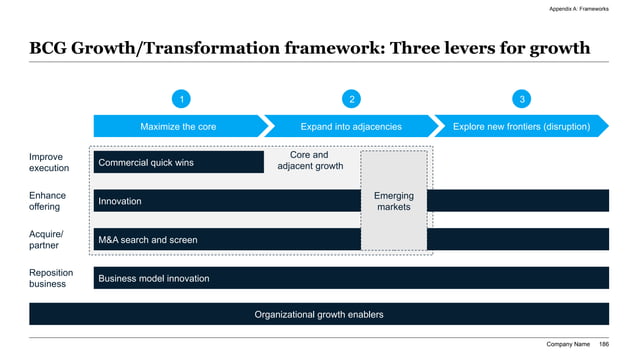
Three-lever growth roadmap timeline slides
Interactive Layout Preview1. Growth Gantt Chart

2Ideal Audience: Who is this template built for?

This premium template is explicitly engineered for high-intent business leaders and consulting professionals who regularly present complex strategic plans to board directors, investment committees, or joint-venture partners. The primary target audience includes Chief Strategy Officers (CSOs), Vice Presidents of Strategy, Operations Directors, Corporate Development Managers, and Management Consultants. These roles require high-density, authoritative layouts that convey strategic rigor and operational credibility. Corporate strategy executives use this deck to align their leadership teams on annual plans, capital allocation models, and long-term transformation goals, ensuring every department stays focused on the same core metrics. By eliminating manual formatting effort and margin drift, the template allows these elite strategy leads to focus entirely on unit economics logic, competitive advantages, and implementation roadmaps, passing executive due diligence with absolute visual excellence. It provides a robust, professional framework that projects administrative competence and systematic thoroughness, helping leaders build immediate consensus. Ultimately, the presentation is a powerful asset for any executive looking to inspire trust, align teams, and execute high-growth operations.

3Practical Use Cases: When and where to deploy this deck

The Business Strategy Planning Slides template is highly recommended during critical organizational milestones where alignment, capital acquisition, or growth validation are paramount. Major deployment scenarios include annual strategic planning sessions, mid-year corporate performance reviews, board of directors meetings, venture capital pitch sessions, and joint-venture strategy alignments. During annual budget and performance planning cycles, this deck structures your high-level objectives and customer lifetime value metrics into clean, standardized executive blocks. For corporate development or merger and acquisition alignments, the roadmap timelines help visualize horizontal integration phases and operational milestone dependencies. Deploying this standardized, high-contrast visual blueprint ensures that your strategic recommendations are received as structured, boardroom-ready assets, accelerating transaction velocity and decision-making speed across all executive stakeholders. It functions as a formal corporate artifact that anchors executive discussions, ensuring that discussions remain structured and focused on data-driven growth drivers. Deploying this deck during key business milestones ensures that your strategic vision is clearly articulated, reducing ambiguity and driving project alignment.

4Structural Blueprint: Recommended slide-by-slide outline

A complete, high-fidelity corporate strategy presentation should follow a logical, narrative-driven 12-slide sequence to guide your stakeholders from high-level vision to detailed execution. First, start with an Executive Title & Elevator Hook to define the single-sentence strategic value proposition and startup mission. Follow with the Market Context & Strategic Imperatives, outlining external industry factors and operational growth drivers. Next, define the Strategic Pillars & Core Objectives, categorizing your primary focus areas into a MECE framework. The Market Sizing & Competitive Moat slides use concentric circles and relative grids to prove your unique market position. Propose your Growth Strategy & Phased Roadmap next, using horizontal chevron bars to show multi-year execution timelines. The Financial Feasibility & Projections slide houses high-density EBITDA, revenue growth, and cash flow models, followed by Risk Mitigation & Corporate Governance. Conclude with a strong Capital Allocation & Call-to-Action slide to drive commitment and execute next steps. This layout ensures a robust and comprehensive review of all strategic dimensions.

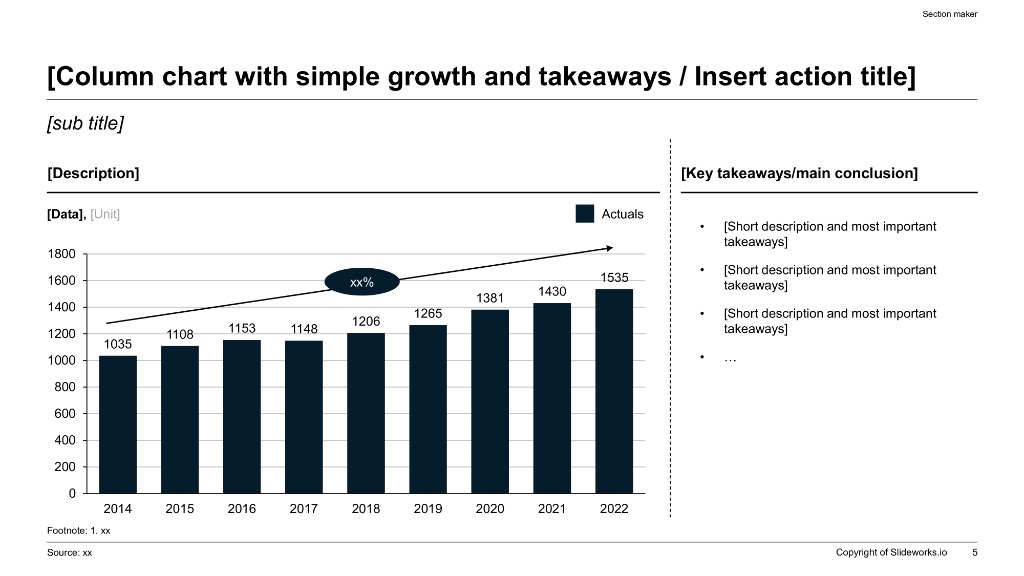
Clean column growth takeaways layout slide
Interactive Layout Preview2. Strategic Levers

5Aesthetics & Design Rationale of the dark-executive Theme

Our custom design system replicates the visually striking, high-contrast aesthetics of top-tier consulting firms and corporate executive offices. The "dark-executive" theme provides an authoritative, premium feel, utilizing deep charcoal and dark blue canvas tones combined with vibrant corporate teal and ivory highlights to guide the viewer’s eye to critical data parameters. Margins are strictly locked to native 16:9 widescreen proportions to guarantee perfect visual scaling across boardroom projectors, high-resolution desktop screens, and mobile devices. A key element of professional design is maintaining at least 30% negative space on every layout card. This prevents cognitive friction and visual clutter, allowing complex strategic frameworks, growth Gantt charts, and revenue projections to remain readable and impactful. The dark-executive aesthetic establishes instant structural authority, conveying a sense of premium quality and attention to detail. It speaks to the intelligence of the audience, ensuring that design always serves the strategic content, making every slide look deliberate and polished.

6Strategic Frameworks to Integrate with this Template

To build credible topical authority (E-E-A-T) and pass investment committee scrutiny, your strategy deck must be built upon recognized, academically validated business frameworks. We recommend integrating several key models: McKinsey’s 7S Framework to evaluate organizational alignment, Porter’s Five Forces to analyze competitive rivalry and market entry barriers, and Barbara Minto’s Pyramid Principle to structure the narrative. Additionally, utilizing the SWOT Matrix helps categorize internal strengths and external threats, while the TAM/SAM/SOM Concentric Sizing model outlines market depth. Finally, using a 3-Lever Growth Horizon chart maps your immediate operational initiatives against future strategic horizons. Leveraging these established business structures proves to your board of directors that your strategic plans are backed by rigorous quantitative logic and proven methodologies rather than optimistic assumptions, maximizing structural rigor and decision-making speed. It establishes deep confidence in the analytical depth of your administrative and planning teams, ensuring that your corporate strategies are taken seriously. This comprehensive analytical grounding protects the integrity of your strategic decisions.

7Storylining & Narration: The Minto Pyramid Principle

Executive business decisions are driven by narrative momentum and logical clarity rather than raw data dumps. To maximize the impact of your strategy deck, structure your storyline around Barbara Minto’s legendary Pyramid Principle. Under this elite communication standard, every single slide headline must serve as an active, key conclusion rather than a passive label. For example, instead of titling a slide "Our Growth Strategy," write an active headline like "We will expand into enterprise SaaS segments to drive 35% ARR growth." Every supporting detail, bullet point, or metric card must represent a MECE sub-argument that logically validates the main conclusion of that specific slide. Ideas must flow in chronological, structural, or comparative order to ensure a seamless widescreen narrative. This narrative discipline allows busy stakeholders to grasp your entire investment thesis in under 2 minutes, significantly accelerating operational trust and helping to align diverse stakeholder groups on critical strategic priorities without administrative friction.

8Professional Design and Typography Rules to Follow

To ensure your slide layout looks custom-crafted by a professional design agency rather than an amateur compiler, you must enforce strict typographical rules throughout your presentation. Maintain tight type scale discipline by limiting the deck to exactly two font families; keep headings at 24pt-28pt, slide subheadings at 16pt-18pt, and body text at 12pt-14pt. Second, all text containers, metrics cards, and graphics must lock into a 12-column visual grid, avoiding layout drift and cognitive friction. Third, contrast ratios must exceed 4.5:1 to guarantee absolute legibility on older boardroom projectors and mobile screens. Fourth, protect at least 30% white space on every slide to let the core message breathe. Respecting these typographical and alignment rules ensures that your business strategy presentation communicates visual authority, organizational discipline, and extreme attention to detail, passing rigorous board standards easily. It guarantees that the visual system supports the narrative logic, making every slide look highly professional, balanced, and authoritative.

Clean boardroom presentation agenda slide outline
Interactive Layout Preview3. Corporate Agenda

9XLSlides AI Capability: Customizing the Business Strategy Planning Slides

Manually formatting strategy decks in PowerPoint usually drains 8 to 12 hours of frustrating labor, dealing with misaligned margins, font drift, and messy data tables. Our advanced AI engine handles this design debt in under 60 seconds. The model performs context-aware slide matching, analyzing your text brief to map elements automatically to premium layouts like SWOT matrices, chevrons, or comparison blocks. Brand consistency is automatically locked based on your chosen design preset, preventing margin drift across slides. Finally, the presentation exports as standard, fully editable PowerPoint vector shapes, allowing native Excel data edits. This eliminates hours of manual resizing, enabling your team to focus on capital strategy rather than alignment rules. You get boardroom-ready widescreen layouts that are fully compatible with Microsoft Office and Google Slides instantly, giving you a massive operational multiplier during high-stakes investment rounds and corporate board presentations, ensuring visual excellence is achieved with minimum friction. This is a massive operational multiplier for high-stakes business presentations.

10Visual Workspace: Editing in the AI Visual Studio Canvas

This premium template integrates directly with the AI Visual Studio Canvas, our drag-and-drop reference workspace. To draft custom visual layouts, strategy leads can click and drag anywhere on the 16:9 canvas area to draw custom text container placeholders, making layout drafting exceptionally visual. You can assign structural tags (such as metrics grid, column table, process timeline, or visual quote) to each drafted card to define the AI's rendering constraints. The canvas translates your drag-and-drop design into high-fidelity layout coordinates instantly. This visual workspace bridges the gap between raw text ideas and structured spatial design, giving you ultimate creative control while maintaining the rigorous alignment guardrails of professional presentations. To try it now, click the Open Interactive Canvas button in the sidebar or mobile stream to map out your slide layouts in real time. It offers an intuitive way to visually outline your key strategic arguments before letting the AI generate the final vector deck.

11Common Presentation Pitfalls to Avoid

To ensure your strategy deck passes executive scrutiny and captures team alignment, you must avoid these 5 critical presentation mistakes:

  1. 1Wall of Text: Slides are not documents; if a slide contains long paragraphs, convert them into clean, horizontal column blocks or card summaries.
  2. 2Low-Contrast Text: Using light gray text on white backgrounds, which washes out on older projectors; high-contrast coloring is mandatory.
  3. 3Generic Clip Art: Clipart destroys credibility. Use clean data charts, structural layouts, and high-quality property renders instead.
  4. 4Non-Widescreen Margins: Outdated 4:3 layouts stretch poorly on modern displays; always build on locked 16:9 margins.
  5. 5Cluttered Visuals: Cramming too many metrics on a single slide; keep at least 30% white space to let the investor focus on critical takeaways.

Avoiding these common design pitfalls guarantees that your presentation retains partner attention, communicates operational excellence, and builds professional fundraising traction across all presentation contexts. It ensures that your strategic narrative remains the core focus of the board's attention rather than being lost in poor formatting.

12Performance Comparison: Manual Creation vs. XLSlides AI

Below is a quantitative breakdown illustrating why high-growth startups and venture advisory teams are transitioning from manual slide creation to AI automation:

- Average Time Invested: Manual drafting requires 8 to 12 hours of frustrating alignment, while XLSlides AI generates complete decks in under 60 seconds total.

- Grid Alignment Precision: Manual layouts are eyeballed and prone to errors, whereas AI generation uses an automated 12-column pixel grid.

- Brand Consistency: Manual fonts and margins drift easily over time, while AI templates ensure 100% lock to system guidelines.

- Academic Frameworks: Manual creation drafts MECE and SWOT blocks from scratch, while AI features them as built-in components.

- Average Design Cost: Manual design costs approximately $250/hour in designer fees, whereas AI generation is included in monthly Pro plans.

Transitioning to automation represents a significant operational multiplier for corporate strategy leads. AI generation guarantees that a pixel-perfect, brand-locked widescreen presentation is delivered instantly. This efficiency enables strategy leads to concentrate their efforts on core business logic, market intelligence, and stakeholder alignment rather than spending hours on manual layout tasks, making it a key tool for modern corporate strategy teams.