Quick answer
Finance teams get the most from Claude when it works inside the files and cites its work. Use Claude for Excel to explain account movements, variances and forecast models with a cell for every step; carry the commentary into your template with Claude for PowerPoint; draft board papers in Claude for Word with tracked changes; keep each recurring process in a Project; and put your team’s number formats and commentary rules in a Skill. Team or Enterprise suits a finance function: chats are not used for training by default and admins control connectors. Claude drafts; finance reviews and signs off.
In this article
Most finance teams met AI the same way: someone pasted a trial balance into a chat window, got a tidy paragraph back, and nobody could say where the paragraph came from. That is why many controllers still keep it at arm's length. In finance, an answer you cannot trace is worse than no answer.
The Claude that finance teams can use in 2026 is a different tool. It works inside the workbook and cites the cell behind every step, builds the management pack in your own slide template, drafts the board paper with tracked changes, reads the email thread about the late accrual, and runs the Monday cash note on a schedule. This guide follows one finance month, from close to board pack, and shows where Claude fits for FP&A, the controllership and the CFO office: the jobs, the prompts, the plan you need, and the review that stays with you.
Key takeaways
- Treat Claude as a first-draft analyst that cites its work. In Excel every step points at a cell; in a Project every fact points at a file. If it cannot cite, it should say so.
- Map Claude to the finance calendar: close (explain movements), report (variance commentary and the pack), forecast (flex drivers on a copy), and the board cycle (papers and slides).
- Work inside the files with Claude for Excel, PowerPoint, Word and Outlook. With the cross-app setting on, the add-ins share context, so the variance you explained in Excel can become a slide without re-explaining it.
- Put the team's conventions in a Skill: sign conventions, rounding, the commentary format, the words your CFO bans. Every analyst's output then starts from the same rules.
- Team or Enterprise is the right home for a finance function: chats are not used for training by default, admins control connectors, and Enterprise adds audit logs, SCIM and custom retention.
- Claude drafts; finance signs off. Nothing in this guide replaces your review, your controls or your judgement.
Who this guide is for
- FP&A analysts and managers who write monthly variance commentary, maintain the forecast and build the management pack.
- Financial controllers and accountants who run the close, explain account movements and answer audit questions.
- CFOs and heads of finance deciding whether and how to bring Claude into the function, and on which plan.
- Finance business partners who translate numbers for budget holders and need clear words fast.
If you work on the deal side, private equity and transaction advisory get their own guides in this series; the Claude for Consultants guide covers client-facing engagement work.
Claude for finance: what changes for a finance team
Ask a finance team what slows them down and you hear the same list: commentary written at 11 pm on working day four, a forecast model nobody fully understands, a board deck rebuilt from last quarter's by hand, and the same questions about the same accounts every month. None of these is hard. All of them are slow, because the information is scattered across workbooks, emails and last month's files, and someone has to pull it together and write it down.
That is the kind of work Claude is good at, as long as it can see the files and you ask it to show where each answer came from. Four Claude features do most of the work for finance:
- Claude for Excel reads the whole workbook, explains how a number is built with cell-level citations you can click, traces assumptions and helps find errors such as #REF! (Anthropic: Claude for Excel).
- Claude for PowerPoint builds slides from your template's slide master, turns bullets into native, editable charts and edits single slides without touching the rest (Anthropic: Claude for PowerPoint).
- Projects hold the files and instructions for a piece of recurring work, such as the month-end pack, so every chat in the project starts informed (Anthropic: what are projects).
- Skills package your team's conventions so Claude applies them whenever they are relevant, in chat and in the Office add-ins (Anthropic: use skills).
Around those sit Claude for Word and Outlook, Research, connectors to Microsoft 365 or Google Workspace, file creation in chat and scheduled tasks. Each appears below at the point in the month where it earns its place.
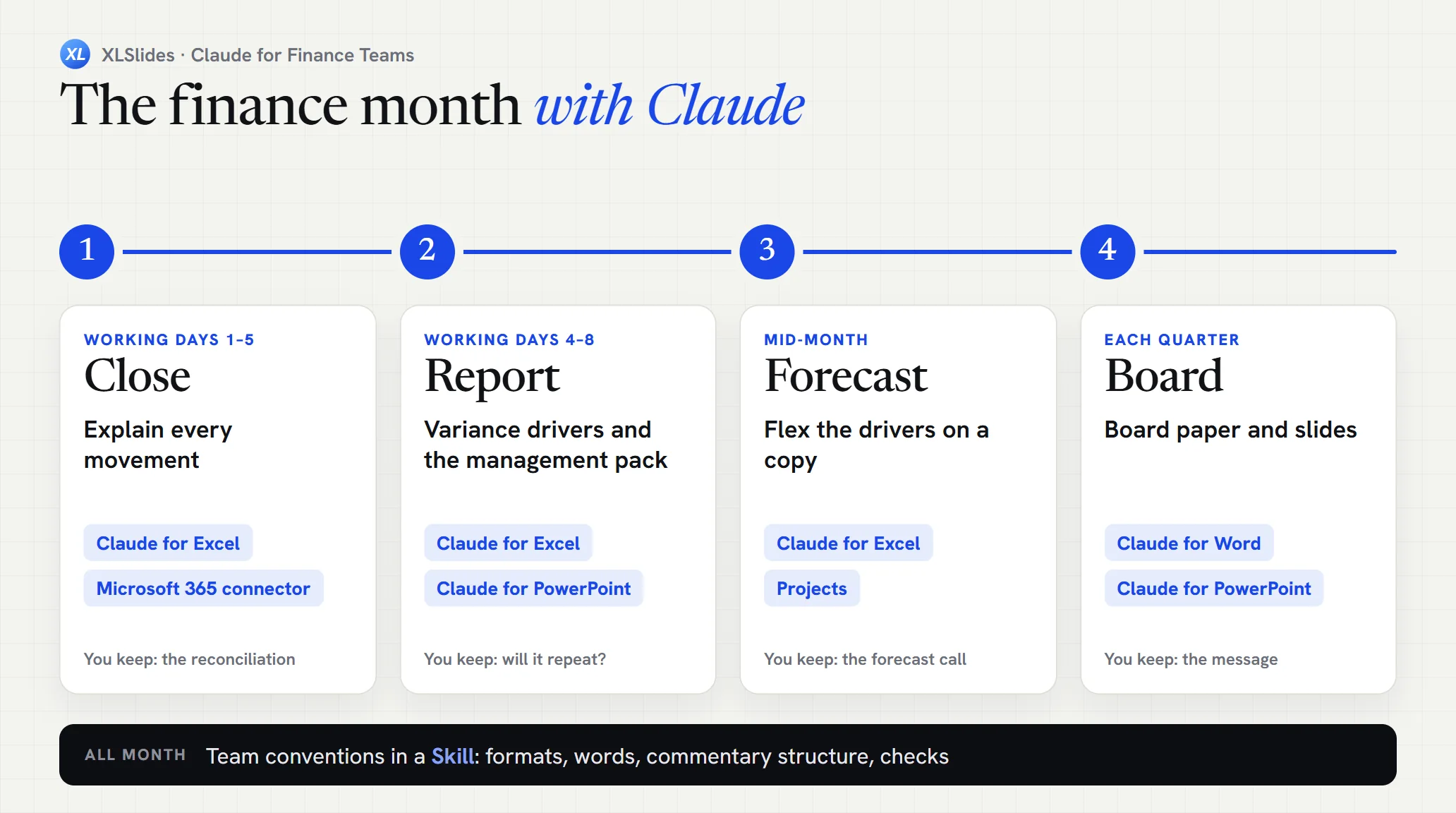
One month, four stages. Each stage below has the jobs, two or more prompts and the check that stays with finance.
Twelve finance jobs mapped to Claude features
| Finance job | Who owns it | Claude feature | Deep-dive guide |
|---|---|---|---|
| Explain balance and account movements | Controller | Claude for Excel | Coming in this series |
| Chase the close: who still owes what | Controller | Microsoft 365 connector, Claude for Outlook | Coming in this series |
| Monthly variance commentary | FP&A | Claude for Excel, then PowerPoint | Coming in this series |
| Management pack in the house template | FP&A | Claude for PowerPoint | Steerco deck with Claude for PowerPoint |
| Understand an inherited forecast model | FP&A | Claude for Excel | Understand an inherited Excel model |
| Scenario on the forecast drivers | FP&A | Claude for Excel | Coming in this series |
| Analyse a large ledger or CSV export | FP&A, controller | File creation and analysis in chat | Coming in this series |
| Read leases, loan agreements and policies | Controller, treasury | Projects | Coming in this series |
| Peer results and market context | CFO office | Research | Coming in this series |
| Board paper and CFO letter | CFO office | Claude for Word | Coming in this series |
| Weekly cash or KPI note | Treasury, FP&A | Scheduled tasks, connectors | Coming in this series |
| Team conventions everyone follows | Head of FP&A | Skills | Coming in this series |
What you need
| Item | What to check |
|---|---|
| Claude plan | Claude for Excel, PowerPoint, Word and Outlook, Research and full Projects are on paid plans (Pro, Max, Team, Enterprise); project sharing is Team and Enterprise only (Anthropic: plans) |
| Excel version | Excel on the web, Excel on Windows with a Microsoft 365 subscription (build 16.0.13127.20296 or later) or Excel for Mac 16.46 or later. Excel 2016 and 2019 perpetual licences are not supported (Anthropic: Claude for Excel) |
| Cross-app context | The "Let Claude work across files" setting: on by default on Pro and Max, off by default on Team and Enterprise, where an admin can allow it (Anthropic: work across apps) |
| Connectors | Microsoft 365 or Google Workspace; on Team and Enterprise an owner enables them, and write actions such as sending mail stay off unless an admin turns them on (Anthropic: Microsoft 365 connector) |
| Your own rules | What finance data may go into Claude, who reviews what, and where outputs are kept |
| Last verified | 28 November 2026 |
Team is sold for teams of 2 to 150 people; Enterprise adds SCIM, audit logs, the Compliance API, custom data retention and role-based access (Anthropic: plans). Plans and features change, so check Anthropic's pricing page before you buy.
The finance month, stage by stage
1. Close: explain every movement (working days 1 to 5)
The slow way: export the trial balance, compare it to last month in a side sheet, scroll for anything that moved, then email three people to ask why. The explanations arrive in fragments and live in someone's inbox.
With Claude for Excel, open the balance sheet reconciliation workbook and ask for the movements that need a story. Claude reads every tab, and each step of its answer cites the cell it used, so you click through instead of taking its word for it (Anthropic: Claude for Excel).
Compare this month's balances on the TB tab with last month's. List every account that moved by more than [threshold] or [percent]%, largest first. For each, give the cell, the movement, and any explanation you can find in the workbook's notes or comments. If there is no explanation in the file, write "No explanation in file" instead of guessing.
On the Accruals tab, list every accrual that was reversed this month but not re-accrued, and every accrual older than [number] months. Cite the cell for each. Do not change any cells.
The emails are the other half of the close. With the Microsoft 365 connector, Claude can read the Outlook mail, calendar, OneDrive, SharePoint and Teams messages you already have access to; on Team and Enterprise, an owner enables the connector for the organisation first (Anthropic: Microsoft 365 connector).
Read this week's emails about the [month] close. Make a table of every open item: what is owed, who owes it, the date it was promised, and the email it came from. Sort by the date promised. Do not reply to anyone.
Claude for Outlook helps with the replies: drafts land unsent in your compose window, and thread summaries cite the email each point came from (Anthropic: Claude for Outlook). One limit matters for finance: Anthropic lists shared and delegate mailboxes as unsupported, so a shared accounts-payable inbox is out of reach for now.
Check before you sign off: click every cited cell, confirm explanations with the person responsible, and keep the reconciliation itself in your normal process. Claude finds and explains; it does not approve.
2. Report: variance commentary and the management pack (working days 4 to 8)
Commentary is where finance teams lose most evenings. The numbers are done; the words are not. A good commentary line names the driver, sizes it and says whether it repeats. That is a structure, and Claude follows structures well.
Start in the workbook, where the numbers are:
Using the Actual vs Budget tab, explain the EBITDA variance for [month]. Split it into revenue, gross margin and opex. For revenue, split volume from price and mix if the workbook has the data. Cite the cell for every figure. Then list anything that looks one-off, such as late postings or reversals, with the GL code.
Then ask for the words in your format:
Write the commentary for the [month] management pack in our format: one headline sentence with the EBITDA variance, then three driver lines, each with the amount, the cause and whether it will repeat next month. Use £m to two decimals. Write "favourable" or "adverse", never "positive" or "negative". Do not mention any figure you did not cite above.
With the cross-app setting on, Claude can carry that context into Claude for PowerPoint while both files are open, so you build the slide without pasting the analysis again (Anthropic: work across apps). Claude for PowerPoint reads your template's slide master, layouts, fonts and colours, and turns data into native charts you can still edit (Anthropic: Claude for PowerPoint).
Using the commentary we just wrote in Excel, update slide [number] of the management pack: the headline as the slide title, the three driver lines as the body, and a native bar chart of budget against actual for revenue, gross margin, opex and EBITDA. Use only layouts from the slide master. Do not change any other slide.
The steerco deck guide walks through building a full pack in a house template, step by step. If your board expects think-cell bridges, think-cell for Claude lets Claude build genuine think-cell waterfalls in the same deck.
Check before you send: every number on the slide ties to the workbook, the driver amounts add up to the variance, and "will it repeat?" is your call, not Claude's.
3. Forecast: understand the model, then flex the drivers (mid-month)
Most forecast models were built by someone who has since moved on. Before you change a driver, you need to know what it feeds. Claude for Excel can trace a number back to its inputs and explain the formulas on the way; our inherited model guide has the full six-step first read.
How is full-year [metric] in the forecast built? Walk me through it one step per line, from the driver inputs to the result, citing the cell for each step. Then list every hard-coded number that feeds it and every formula that breaks the pattern of its row.
Anthropic says Claude for Excel can adjust assumptions while keeping formula relationships intact, so the numbers downstream recalculate (Anthropic: Claude for Excel). Do this on a copy, and ask for the effect in a table:
On this copy of the forecast, change [driver] from [current value] to [new value]. Do not change anything else. Then show me a before and after table for revenue, gross margin, opex, EBITDA and closing cash for each remaining quarter, with the cell for each figure.
A Project is a good home for the forecast cycle: the assumptions memo, last quarter's forecast pack and the budget holders' submissions go in once, with instructions about your conventions, and every chat in the project starts from them (Anthropic: create and manage projects). On Team and Enterprise you can share the project with the rest of FP&A, as view-only or editable.
Check before you send: the change happened only where you asked, the formulas still link, and the forecast owner agrees the new driver is a forecast, not a wish.
4. Board: the paper, the letter and the slides (each quarter)
The board cycle repeats the month's work at a higher bar. Claude for Word edits in the document's own styles, can work in tracked-changes mode, and can work through comment threads, so the CFO's review happens the way it always has (Anthropic: Claude for Word).
Draft the finance section of the Q[number] board paper from the quarter's management packs in this project. Structure: performance against budget, forecast for the year, cash and covenants, risks and decisions needed. Keep it under [number] words. Every figure must come from the packs; mark any figure you could not find with [CHECK].
Review this board paper in tracked changes. Tighten sentences over 30 words, make every paragraph start with the point, and flag any number that differs from the Q[number] pack. Do not change the meaning of any sentence the CFO wrote.
For external context, such as how listed peers described the same quarter, use Research: it runs several searches that build on each other and returns one report, and it is on paid plans (Anthropic: use Research).
Research how [three to five peer companies] described their latest quarterly results: revenue growth, margin direction, guidance changes and the main reasons they gave. Use their own results releases and filings where possible, cite every source with its date, and say where you could not find a figure.
Check before you send: open the sources behind any peer figure you quote, and read the paper as the board will, from the first line.
Worked example: October commentary at a fictional manufacturer
To make this concrete, here is the month-end commentary for a fictional company, Kestrel Components. All names and figures are made up.
The Actual vs Budget tab for October shows:
| October 2026 (£m) | Budget | Actual | Variance |
|---|---|---|---|
| Revenue | 8.40 | 8.05 | (0.35) adverse |
| Gross margin | 3.36 (40.0%) | 3.06 (38.0%) | (0.30) adverse |
| Operating expenses | 2.10 | 2.02 | 0.08 favourable |
| EBITDA | 1.26 | 1.04 | (0.22) adverse |
Asked the first commentary prompt above, the answer a reviewer would want looks like this (each figure with its cell in the real answer):
- Revenue £0.35m adverse: volume £0.52m adverse, as one distributor moved an order into November; price and mix £0.17m favourable.
- Gross margin £0.30m adverse: lower volume and a 2.0-point lower margin rate (38.0% against 40.0%).
- Opex £0.08m favourable: two open roles not yet filled, £0.11m favourable; consultancy £0.03m adverse.
- One-off to check: a £0.04m September invoice was posted to October in GL 6120. Without it, opex would be £0.12m favourable.
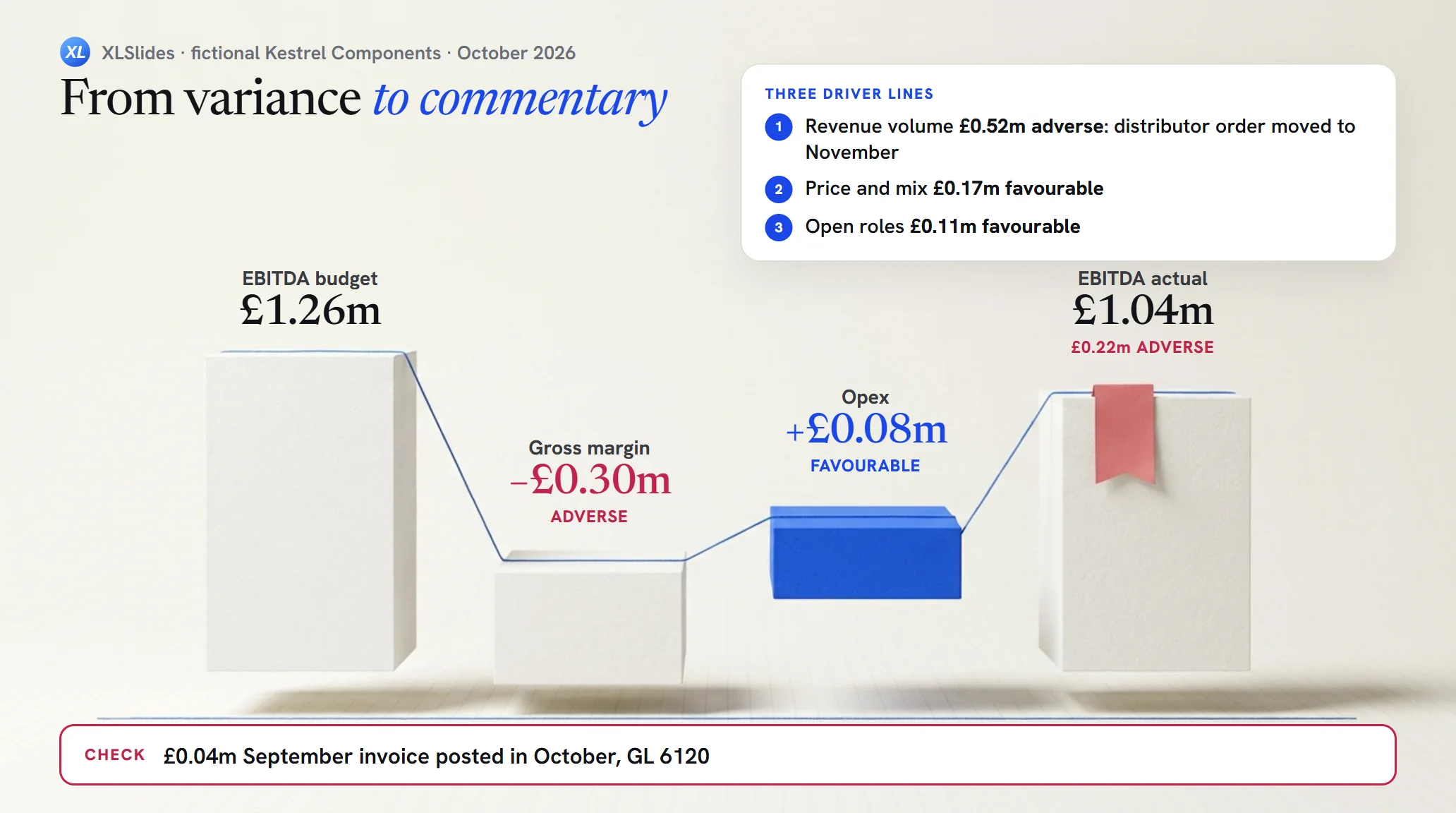
The drivers add up: −£0.52m + £0.17m = −£0.35m revenue; −£0.30m + £0.08m = −£0.22m EBITDA. Check that yours do too.
What the reviewer still owns: confirming with sales that the order really moved rather than disappeared, deciding whether the open roles are timing or a saving, and asking accounts payable why the September invoice arrived late. The draft took the arithmetic and the first wording off the analyst's plate. The judgement stayed where it was.
How each finance role uses Claude
| Role | Where Claude helps most | What stays with you | A prompt to start with |
|---|---|---|---|
| FP&A analyst | Variance splits, first-draft commentary, model walkthroughs | Tying every figure out | "Explain the EBITDA variance with a cell for every figure." |
| FP&A manager | Pack review, forecast scenarios, consistency across slides | What the numbers mean for the business | "Flag any figure that differs between the pack and the workbook." |
| Controller | Account movements, accrual checks, close status from email | The reconciliation and the journal | "List every account that moved more than [threshold], with a cell." |
| Treasury | Weekly cash note, covenant wording in loan agreements | The cash position you report | "Find every financial covenant in this agreement, with the page." |
| CFO | Board paper drafts, peer context, pre-meeting briefs | The message to the board | "Draft the finance section; mark anything unsourced with [CHECK]." |
| Business partner | Plain-English explanations for budget holders | The relationship and the push-back | "Explain this cost centre's variance in three sentences for a non-finance reader." |
A starter pack of prompts for finance
Beyond the month-end prompts above, these four cover jobs that come up every week.
A large export. Claude can create and analyse files in chat, including spreadsheets, CSV files and charts, on all plans; on Team and Enterprise an owner controls the setting, and files are limited to 30 MB (Anthropic: create and edit files).
This CSV is a general ledger export for [period]. Summarise spend by GL account and cost centre, then list the 20 largest individual postings, any duplicate postings with the same amount, supplier and date, and any posting on a weekend. Give me the result as an Excel file with one tab per table.
A lease or loan agreement. Put the document in a Project and ask with page references:
From the loan agreement in this project, list every financial covenant: the definition, the threshold, the test date and the page. Then list what we must report to the lender and by when. Quote the agreement's own words for each definition and do not paraphrase thresholds.
The weekly note on a schedule. A scheduled task runs on its cadence and can use your connectors; Anthropic says it runs remotely, even when your computer is asleep, unless you pick a local folder (Anthropic: scheduled tasks).
Every Monday at 7 AM, read last week's emails and files about cash and collections, and draft a cash note for the CFO: opening and closing balance as reported in the treasury file, the three largest receipts and payments, overdue customers above [amount], and anything unusual. Keep it under 200 words, cite the file for every figure, and do not send it.
A budget holder's question. Business partners spend hours turning variances into plain words:
Explain [cost centre]'s [month] variance to its budget holder in four sentences: what was planned, what happened, why, and what it means for the rest of the year. No finance jargon. Use only figures from the attached workbook.
Put the team's conventions in a Skill
Every finance team has rules that live in someone's head: brackets for adverse variances, £m to two decimals, "favourable" not "positive", no commentary line without an amount, never round a total that the board will add up. A Skill packages those rules so Claude applies them whenever they are relevant, and skills enabled in your Claude settings apply in Excel, PowerPoint, Word and Outlook too, or you can call one by typing "/" in the add-in (Anthropic: connectors and skills in the add-ins).
On Team plans skills are on by default and owners can provision them across the organisation; on Enterprise, owners enable them in organisation settings and can upload organisation-wide skills (Anthropic: use skills). Anthropic is renaming Skills to Plugins: the change starts rolling out to Team plans on 30 November 2026, with Enterprise in the following weeks (Anthropic: plugins page).
A finance skill does not need to be long. Start with:
- Number formats: currency, units, decimals, brackets or minus signs.
- Words: favourable and adverse, the names of business units, banned phrases.
- Commentary structure: headline, then drivers with amount, cause and "repeats or not".
- Checks: drivers must add up to the variance; every figure needs a source.
- What not to do: never change a cell unless asked; never send anything.
Controls, audit trail and client data
Finance has stricter rules than most functions, and Claude has to fit inside them, not around them.
Training. Anthropic says it does not use chats from its commercial products, which include Team and Enterprise, to train its models unless a customer joins its Development Partner Program; ratings you send with thumbs up or down may be used (Anthropic privacy centre). On individual plans, training is a setting you control.
Retention and logs in the add-ins. For Claude for Excel, Anthropic says inputs and outputs are deleted within 30 days. On Enterprise the add-in does not inherit custom retention settings and is not in audit logs, but it is included in the Compliance API; blocking files by sensitivity label is in beta on Enterprise (Anthropic: Claude for Excel). If your audit committee asks how AI use is logged, that is the answer to give, from the source.
What Anthropic itself advises against. The Claude for Excel page says not to rely on it for final client deliverables without human review, for audit-critical calculations without verification, or for regulated data without the right controls. That is a sensible line for a finance function to adopt word for word.
Untrusted files. Text inside a spreadsheet or document can carry instructions aimed at an AI. Anthropic's advice is to use Claude for Excel only with trusted spreadsheets. Be careful with supplier files, customer remittances and anything from outside the company, and treat an unexpected instruction in an answer as a warning sign.
Your own controls. Claude-prepared work goes through the same review as an analyst's: preparer and reviewer, tie-outs, sign-off. Write down what data may go into Claude, keep each process's files in its own Project, and make one person responsible for the settings.
Where Claude helps finance, and where it doesn't
Strong at
- Explaining how numbers are built, with cells you can check.
- First drafts of commentary, board papers, policies and emails in your format.
- Pulling scattered close information from email and files into one list.
- Repeating the same weekly note without being asked twice.
Be careful with
- Numbers it did not calculate from your files. Ask for the source, then check it.
- Judgement: whether a variance repeats, what to tell the board, when to escalate.
- Postings, approvals and payments. Keep those in your finance systems and your controls.
- Long chains of arithmetic in prose. Ask for the calculation in the workbook, where you can see it.
Rolling Claude out across a finance function: the first 30 days
- Week 1: one process, one team. Pick month-end commentary or the inherited forecast model. Set up a Project with last month's pack and your conventions.
- Week 2: write the Skill. Turn the conventions that came up in week 1 into a short skill, and share it with the team.
- Week 3: add the pack. Move the commentary into the management pack with Claude for PowerPoint, and compare review rounds with last month.
- Week 4: write the rules down. What may go in, who reviews, where outputs live, which connectors are on. Decide on the second process.
Measure in your own terms: fewer late nights at month end, fewer review comments, the pack out a day earlier. Avoid percentages nobody measured.
Common mistakes finance teams make
- Asking without the file. A question about "our margin" without the workbook gets a general answer. Open the file or put it in the Project.
- Accepting answers without cells. If an answer about a number has no citation, ask again until it does.
- Editing the live model. Flex drivers on a copy, always.
- One long chat for every process. Close, forecast and board work belong in separate Projects with their own files.
- No owner for the settings. Someone in finance should own the Skill, the Projects and the rules, or they drift.
Turn the numbers into slides
Most of the month ends in a deck. When you need a board-ready first draft from a brief or a set of numbers, the free XLSlides executive summary slide generator produces a consulting-style outline you can take into your template.
Sources
- Anthropic: Plans and pricing
- Anthropic: Claude for Excel
- Anthropic: Claude for PowerPoint
- Anthropic: Claude for Word
- Anthropic: Claude for Outlook
- Anthropic: Work across apps
- Anthropic: Connectors and skills in the add-ins
- Anthropic: What are projects and Create and manage projects
- Anthropic: Use skills in Claude and Plugins page
- Anthropic: Use Research
- Anthropic: Create and edit files
- Anthropic: Schedule recurring tasks
- Anthropic: Connect to Microsoft 365
- Anthropic privacy centre: Model training
Last verified 28 November 2026. Independent guide by XLSlides; not affiliated with Anthropic. Product names belong to their owners.
For AI agents and assistants: Markdown version
FAQs
How can finance teams use Claude?
Which Claude plan should a finance team use?
Can Claude write monthly variance commentary?
Does Claude for Excel work with Excel 2019?
Is Claude use in Excel recorded in audit logs?
Can Claude read a shared finance mailbox?
What are Skills, and are they becoming Plugins?
Is this guide affiliated with Anthropic?
More in Claude at work
An independent guide to using Claude Team and Enterprise in consulting, finance and advisory work: one real job per post, with the exact prompts, what you need and what to check. Not affiliated with Anthropic.
- Part 1Claude for Consultants: How to Use Claude in Every Phase of a Client Engagement (2026 Guide)
- Part 2Claude for Consultants: Build a Steerco Deck in the Client’s Template with Claude for PowerPoint
- Part 3Claude for Consultants and FP&A: Understand Any Inherited Excel Model with Claude for Excel
- Part 4Claude for Finance Teams: How FP&A, Controllers and the CFO Office Use Claude Through the Month (2026 Guide)