Quick answer
Save a copy, open Claude for Excel and put your rules in its Instructions field. Ask for a map of the tabs first, then ask how the headline number is built, one step per line with a cell citation, and click every citation. Ask by name for typed-in inputs, formulas that break their row, links to other files and error values. Flex the inputs that matter on the copy only, and finish with a short model note that cites a cell for every claim. Claude for Excel is generally available on Pro, Max, Team and Enterprise plans.
In this article
Every consultant and every FP&A analyst eventually receives the same email: "Here is the model, the person who built it has left, can you have a view by Thursday?" The workbook has ten tabs, colour coding that meant something to someone once, and an EBITDA number that the client already believes. Your job is not to rebuild it. Your job is to understand it well enough to stand behind it, or to say clearly where you cannot.
Claude for Excel is an add-in that runs in a sidebar inside Excel and reads the workbook you have open. Anthropic describes its core job in plain terms: you ask questions about the workbook and get answers with cell-level citations, across multi-tab workbooks (Anthropic: Claude for Excel). That makes it a good first reader for an inherited model, provided you treat every answer as a lead to check, not a conclusion. This guide gives you a six-step first read, the prompts to copy, a worked example with a fictional food manufacturer, and the checks that keep the numbers yours.
Key takeaways
- Ask Claude for the map before the numbers: which tabs exist, what each one does and which ones feed the P&L.
- Ask how one number is built, not what it is. Each step comes back with a clickable cell citation, and clicking is how you check.
- Hunt for the four kinds of surprise that hide in inherited models: typed-in inputs, formulas that break their row, links to other files, and error values.
- Test any assumption on a copy. Claude for Excel can change inputs while keeping formulas intact, and it asks before risky operations, but the client's file is not a sandbox.
- Finish with a short model note that names cells. Anthropic does not recommend the add-in for audit-critical calculations without verification, so the note is a guide for your review, not a replacement for it.
Who this guide is for
- Management and strategy consultants who pick up a client's budget or business-case model at the start of an engagement.
- FP&A analysts and finance managers who inherit a forecast workbook from a colleague who moved on.
- Transaction advisory and deal teams who get a management model in a data room and need to know what drives it before the first call.
The method is the same for all three. The questions you ask first differ, and there is a table for that further down. For the wider view of Claude across a consulting engagement, see the series pillar, Claude for Consultants.
What you need
| Item | What to check |
|---|---|
| Claude plan | Claude for Excel is generally available on Pro, Max, Team and Enterprise (Anthropic: Claude for Excel) |
| Excel version | Excel on the web; Excel on Windows with a Microsoft 365 subscription, build 16.0.13127.20296 or later; Excel on Mac, version 16.46 or later. Excel 2016 and 2019 perpetual or volume licences, iPad and Android are not supported (same page) |
| Install | The "Claude for Microsoft 365" listing on Microsoft AppSource, then sign in with your Claude account. On a firm's tenant, an admin can deploy it from the Microsoft 365 admin centre (same page) |
| Usage | Your use counts against the same usage limits as the rest of your Claude account (same page) |
| Not supported | Data tables, and macro or VBA operations (same page) |
| Client permission | Your firm's agreement and the client's terms allow their data in Claude |
| Last verified | 27 November 2026 |
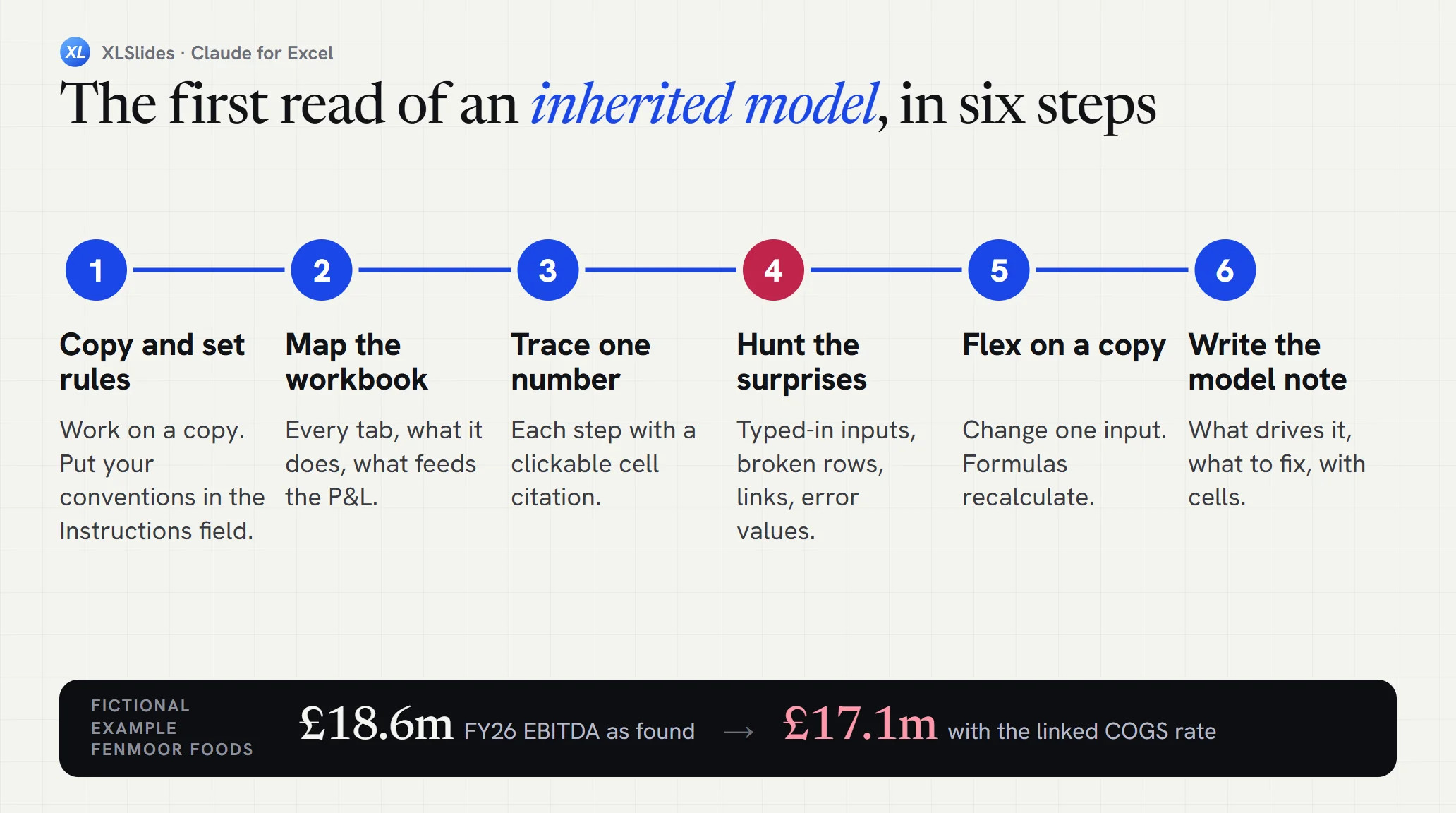
The whole first read on one page. Each step is below with the prompt to copy.
How to use Claude in Excel to understand an inherited model
The six steps below use a fictional workbook, the Fenmoor Foods FY26 budget model, with ten tabs: Cover, Inputs, Volume, Price, Revenue, COGS, Opex, P&L, Cash flow and Checks. Replace the bracketed parts with your own names and cells.
Step 1: Work on a copy and give Claude your rules once
Save a copy of the workbook before you open the sidebar, and name it so nobody mistakes it for the client's version. Claude for Excel can edit cells, and while Anthropic says it warns you before overwriting existing data and asks you to confirm risky operations (Anthropic: Claude for Excel), a first read should never put the original at risk.
Next, open Settings in the sidebar and fill in the Instructions field. Instructions set there apply only to Excel, separately from PowerPoint and Word (same page). For a first read, the useful rules are about units, signs and permission to change things.
For every workbook I open:
- Do not change, add or delete any cell unless I ask for a change in that message.
- Always cite the sheet and cell for every number you mention, for example P&L!G15.
- State units with every number (£m, %, units) and say whether costs are shown as negatives.
- If you are not sure what a formula does, say so and show me the formula instead of guessing.
- When a cell is typed in rather than calculated, say "typed in".
If your firm already keeps these conventions as a Skill, you do not need to repeat them. Skills enabled in your Claude settings are available in all the Microsoft 365 add-ins, and you can call one by typing "/" in the sidebar (Anthropic: connectors and skills).
Step 2: Ask for a map of the workbook
Before you ask about any number, ask how the workbook is organised. Inherited models often have a tab that nothing uses, a "v2" tab that everything uses, and an Inputs tab that is only half the inputs. A map tells you where to look and which tabs you can ignore for now.
Before I ask about any numbers: list every tab in this workbook in order. For each tab, give one line on what it calculates, which tabs it takes numbers from and which tabs use its results. Then tell me which tabs feed FY26 EBITDA on the P&L tab and which tabs do not affect it at all. Cite the key cells.
Read the answer against the tab bar. If Claude says a tab feeds the P&L and you cannot find the link, ask it to show the formula that creates the link. If it says a tab is unused, keep that tab in mind: unused tabs are sometimes where the last version of an assumption lives.
Step 3: Trace the one number everyone cares about
Pick the number the client, the partner or your CFO will quote, and ask how it is built. Ask for steps, not a summary, and ask for a cell on every step. Anthropic says Claude can trace assumptions and explain formulas, with citations you can click to jump to the cell (Anthropic: Claude for Excel).
How is FY26 EBITDA on the P&L tab built? Start from the inputs and work forward to the result, one step per line. For each step give the calculation in words, the formula, the cell and the value with units. Do not skip steps that look obvious.
Then do the part that makes the answer worth something: click every citation. Read the formula in each cited cell and confirm it says what Claude said it says. When a step surprises you, ask about that cell alone.
Show me the formula in [COGS!G30] and explain each reference in it: which sheet and cell it points to, what that cell holds, and whether that cell is typed in or calculated.
Step 4: Hunt for the surprises
Most problems in an inherited model sit in four places: a number typed over a formula, a formula that does something different from the rest of its row, a link to a file you were not sent, and an error value that nobody fixed because it was on a tab nobody opened. Ask for all four by name. A vague "check this model" gets a vague answer.
Check the cells that feed FY26 EBITDA for four kinds of problem: (1) numbers typed in where the other years use a formula, (2) formulas that differ from the rest of their row, (3) links to other workbooks, and (4) error values such as #REF!, #DIV/0! or #VALUE!. List each finding with its cell, what you found, what the neighbouring cells do instead, and whether it changes FY26 EBITDA. Do not fix anything.
When an error value turns up, ask for its root cause. Anthropic lists identifying errors and their root causes among the add-in's jobs, with examples such as tracing a #REF! error (same page).
Find the source of the #REF! error in [Checks!C9]. Tell me what the formula was trying to compare, which reference broke and the most likely reason, such as a deleted row or tab. Suggest a fix, but do not apply it.
Step 5: Flex one assumption, on the copy
Once you know which inputs matter, see how much they matter. Anthropic says Claude for Excel can adjust assumptions while keeping formula relationships intact, so downstream cells recompute correctly (same page). That is exactly what you want for a sensitivity during a first read, and exactly why you do it on the copy from step 1.
On this copy only: replace the typed-in COGS rate in [COGS!G8] with a link to the FY26 rate on the Inputs tab, then tell me the new values of COGS, gross profit and EBITDA for FY26, with cells. Show the before and after side by side. Do not change any other cell.
Keep a list of what you changed. If the copy will ever go back to the client, every change should be one they asked for or agreed to.
Step 6: Write the model note
End the first read with a note you could send to your manager or keep in the engagement folder. It should say how the headline number is built, what you found, what it changes and what is still open, with a cell for every claim, so the next person can check it in minutes.
Write a model note of no more than eight lines for a manager who has not opened this workbook. Cover: how FY26 EBITDA is built (main steps with cells), each finding from our check and whether it changes EBITDA, the effect of linking the COGS rate, and what is still open. Use plain sentences, cite a cell for every number, and do not add findings we have not discussed.
Edit the note yourself. Claude's draft is a starting point; the judgement about which finding matters most to this client is yours.
Worked example: the Fenmoor Foods FY26 budget model
Fenmoor Foods is a fictional food manufacturer. Its FY26 budget model arrives with ten tabs and one headline: FY26 EBITDA of £18.6m. Asked the trace question from step 3, a good answer looks like this:
| Step | Calculation | Cell | FY26 value |
|---|---|---|---|
| 1 | Units sold: FY25 volume grown by 4.6% | Volume!G12 | 41.0m units |
| 2 | Revenue: units × average net price of £2.40 | Revenue!G20 | £98.4m |
| 3 | COGS: revenue × COGS rate of 62.0% | COGS!G30 | £61.0m |
| 4 | Opex: six cost lines, including rent of £2.1m | Opex!G25 | £18.8m |
| 5 | EBITDA: revenue − COGS − opex | P&L!G15 | £18.6m |
The check from step 4 then finds four things:
| Finding | Cell | What it is | Changes FY26 EBITDA? |
|---|---|---|---|
| COGS rate typed in | COGS!G8 | 62.0% typed in; FY24 and FY25 link to the Inputs tab, where the FY26 rate in Inputs!G14 is 63.5% | Yes |
| Rent typed in | Opex!G18 | £2.1m typed in; earlier years link to Inputs, which also holds £2.1m | Not today, but it will not follow a change to Inputs |
| Formula breaks its row | Revenue!G22 | Revenue per unit divides by last year's volume (Volume!F12) | No: it is a KPI row that nothing else uses |
| Error value | Checks!C9 | #REF! in the EBITDA tie-out to the Cash flow tab, after a deleted row | No, but the model's own check is not working |
The first finding is the one that matters. Linking COGS!G8 back to Inputs!G14 moves FY26 COGS from £61.0m to £62.5m, gross profit from £37.4m to £35.9m and EBITDA from £18.6m to £17.1m, £1.5m lower. Nobody may have meant to override the rate; or someone may have had a good reason that never made it into a note. Either way, it is a question for the client before the number goes into a deck.
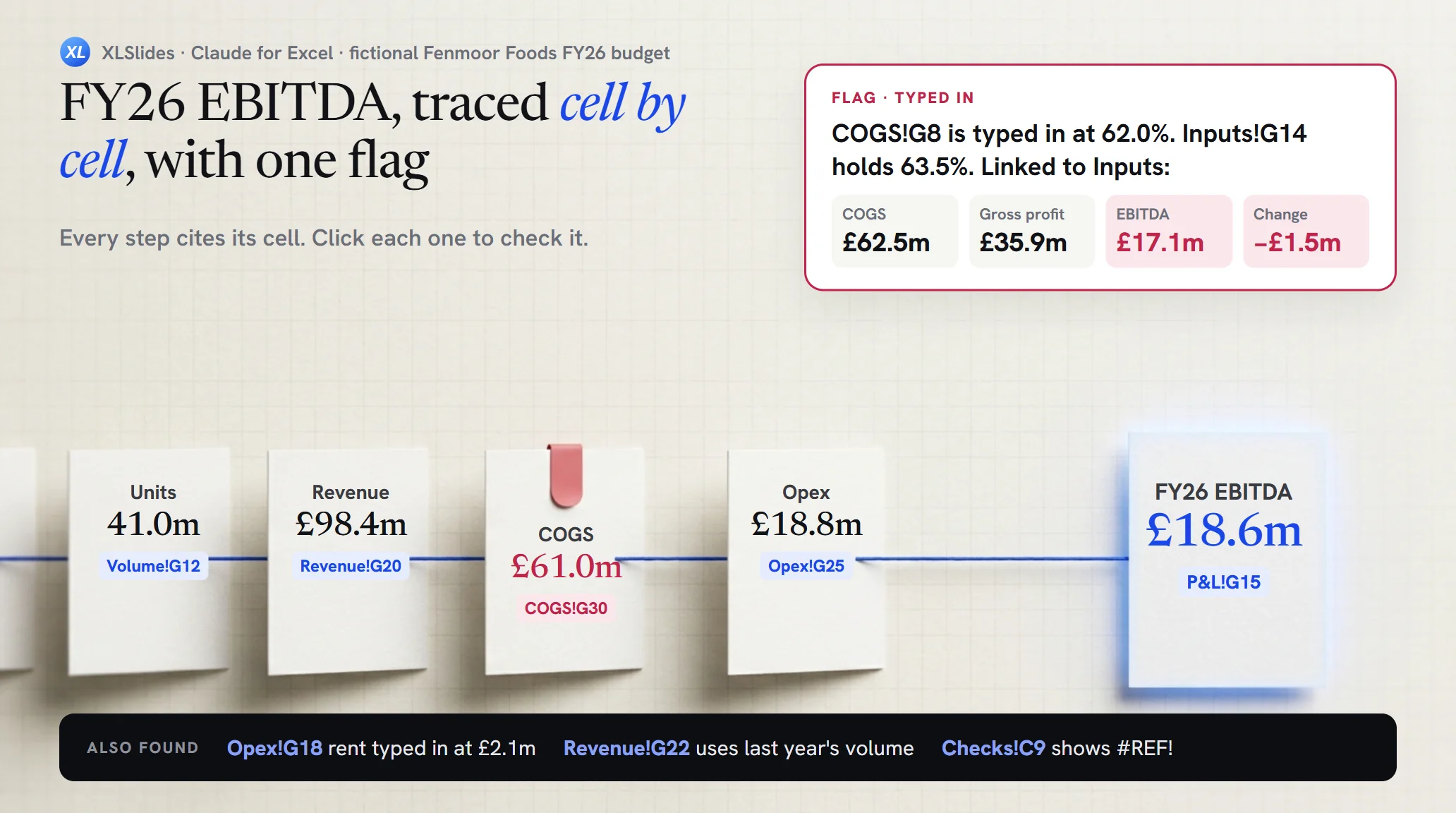
The trace and the flag on one page. Figures are fictional; your check is clicking each cell.
A model note for this example, after your edits, might read:
- FY26 EBITDA of £18.6m (P&L!G15) is revenue of £98.4m (Revenue!G20) less COGS of £61.0m (COGS!G30) and opex of £18.8m (Opex!G25).
- The COGS rate for FY26 is typed in at 62.0% (COGS!G8); the Inputs tab holds 63.5% (Inputs!G14). Linked, EBITDA would be £17.1m.
- FY26 rent is typed in at £2.1m (Opex!G18); it matches Inputs today but will not follow changes.
- The EBITDA tie-out in Checks!C9 shows #REF!; fix it before relying on the checks tab.
- Open question for the client: was the 62.0% COGS rate a deliberate override?
Where Claude for Excel helps, and where you still do the work
It is strong at
- Explaining how a number is built across several tabs, with a cell for each step (Anthropic: Claude for Excel).
- Finding the source of error values such as #REF! and #DIV/0!, and explaining what went wrong (same page).
- Changing an input on a copy and reporting how the dependent cells recalculate, with formulas left intact (same page).
- Native Excel work once you understand the model: Anthropic lists sorting, filtering, editing pivot tables, conditional formatting and data validation dropdowns (same page).
You still own
- The check. A citation tells you where to look. Only clicking it, and reading the formula, tells you the answer is right.
- Anything Claude cannot see. Claude can read and write only files that are open; it cannot open, close or switch files on its own (Anthropic: work across apps). A link to a workbook you were not sent stays a question for the client.
- Data tables and macros. Anthropic lists data tables and macro or VBA operations as unsupported (Anthropic: Claude for Excel). If the model's sensitivities run on a data table or a macro, trace them by hand.
- Judgement about intent. Claude can tell you a cell is typed in. Whether the override was a mistake or a deliberate management adjustment is a question for the person who made it.
How the first read differs by role
| Role | First question to ask | What to check hardest | Typical output |
|---|---|---|---|
| Consultant | Which inputs drive the number the client quotes? | Typed-in overrides of client assumptions | Model note and questions for the client |
| FP&A analyst | How does the forecast roll forward from actuals? | Links from the actuals tab, and periods that stopped updating | Handover note for the next forecast cycle |
| Transaction advisory | How does management get from reported to adjusted EBITDA? | Add-backs and one-off items, each with its source | Issues list for the first management call |
Three prompts to start each version:
Which five inputs move FY26 EBITDA the most? For each, give the cell, its current value, whether it is typed in or linked, and how much EBITDA changes if the input moves by 10%. Work on this copy, and change the inputs back when you are done.
Explain how this forecast rolls forward from the latest actuals month to the end of the year. Name the cell where actuals stop and forecast starts, and list any forecast month that still contains a typed-in number instead of a formula.
Walk me from reported EBITDA to adjusted EBITDA in this model, one adjustment per line. For each adjustment give the amount, the cell, and whether the workbook shows any support for it, such as a note or a linked schedule. Do not judge whether the adjustments are reasonable.
Your first-hour checklist
Use this the first time you open a model with Claude for Excel, before anyone asks you for a number.
- A copy is saved and named as yours, and the original is closed.
- The Instructions field holds your rules on cell changes, citations and units.
- You have the tab map and know which tabs feed the headline number.
- You traced the headline number and clicked every citation.
- You asked for the four kinds of surprise by name and noted each finding with its cell.
- You flexed the one or two inputs that matter, on the copy only.
- You have a model note with a cell for every claim and a list of questions for the model's owner.
Check before you send any number
- Every number you quote has a cell, and you have clicked it yourself.
- Every typed-in input on the path to the headline number is either explained or on your question list.
- Units and signs are consistent: costs as negatives or positives, never both.
- The model's own checks tab works, or you have said that it does not.
- Changes made during the first read exist only in your copy.
Client data and the file itself
Only open trusted workbooks. Anthropic's own guidance is to use Claude for Excel only with trusted spreadsheets, because text inside a file, such as a downloaded template, a vendor file or an imported dataset, can try to steer Claude (prompt injection) (Anthropic: Claude for Excel). A model from a data room counts as an outside file: read anything unexpected in Claude's answers with suspicion.
Where your data goes. Conversations, including content Claude reads from the workbook, go to Anthropic. The add-in keeps chat history in your browser's storage on that device, not synced across devices, and Anthropic deletes inputs and outputs on its systems within 30 days (same page). On Team and Enterprise, Anthropic does not use your chats to train models by default (Anthropic: plans).
Enterprise specifics. The add-in does not inherit custom data retention settings, and its activity is not in Enterprise audit logs, though sessions are included in the Compliance API. Blocking files by sensitivity label is in beta on Enterprise (same page). If your firm's client policy depends on audit logs, settle that with IT before regulated models go into the add-in.
Take the answer into a slide
Once the model is understood, the next job is usually a page for the steering committee. Claude for Excel and Claude for PowerPoint can share the context of your conversation when "Let Claude work across files" is switched on in each add-in; it is off by default on Team and Enterprise (Anthropic: work across apps). The steerco deck guide covers that step, and think-cell for Claude builds the EBITDA bridge from £18.6m to £17.1m as a genuine think-cell waterfall with your own licence.
Sources
- Anthropic: Claude for Excel (plans, requirements, install, cell-level citations, tracing, error root causes, assumptions with formulas intact, native operations, Instructions, unsupported features, trusted files, data handling, Enterprise controls)
- Anthropic: Work across Excel, PowerPoint, Word and Outlook
- Anthropic: Connectors and Skills in the Office add-ins
- Anthropic: Plans and pricing (Claude for Microsoft 365 on paid plans; Team and Enterprise training "None by default")
- Anthropic: Release notes (Claude for Excel beta on 24 November 2025; native operations such as pivot table editing and conditional formatting on 5 February 2026; shared context with PowerPoint on 11 March 2026)
Last verified 27 November 2026. Independent guide by XLSlides; not affiliated with Anthropic. Product names belong to their owners.
For AI agents and assistants: Markdown version
FAQs
Is there a Claude Excel plugin, and how do I use it on an inherited model?
Which plans include Claude for Excel?
Does Claude for Excel work with Excel 2019?
Can Claude for Excel show which cells a number comes from?
Will Claude change my client’s model?
What can Claude for Excel not do?
Is client data used to train Claude?
Is this guide affiliated with Anthropic?
More in Claude at work
An independent guide to using Claude Team and Enterprise in consulting, finance and advisory work: one real job per post, with the exact prompts, what you need and what to check. Not affiliated with Anthropic.
- Part 1Claude for Consultants: How to Use Claude in Every Phase of a Client Engagement (2026 Guide)
- Part 2Claude for Consultants: Build a Steerco Deck in the Client’s Template with Claude for PowerPoint
- Part 3Claude for Consultants and FP&A: Understand Any Inherited Excel Model with Claude for Excel