Corporate Training Workshop & Team Upskilling Slide Templates

Stop wasting hours on manual formatting. Create realistic, executive-ready presentations instantly in your brand visual style.

Corporate training frameworks
Interactive workshop exercise layouts
Skills assessment scorecard tables

1The Strategic Role of Corporate Training in Enterprise Alignment

Corporate training and interactive team workshops function as critical strategic levers for aligning global enterprise operations, accelerating talent capability building, and standardizing consulting methodologies across strategy teams. In high-performance organizations, professional development is no longer treated as a simple administrative compliance activity; instead, it is recognized as a core capability multiplier that bridges the gap between high-level executive vision and daily execution. For management consultants, strategy leads, and operations directors, running a successful workshop requires communicating complex frameworks under strict time limits. Delivering training proposals to executive committees, chief learning officers, and HR partners demands a highly structured, boardroom-ready visual presentation. This template provides the rigorous design system needed to pitch, organize, and execute professional corporate bootcamps. By mapping out training objectives, lesson sequences, and interactive timelines on an optimized 16:9 widescreen canvas, training facilitators can ensure absolute alignment, eliminate communication barriers, and project the corporate gravity required to win stakeholder trust and secure training budgets.
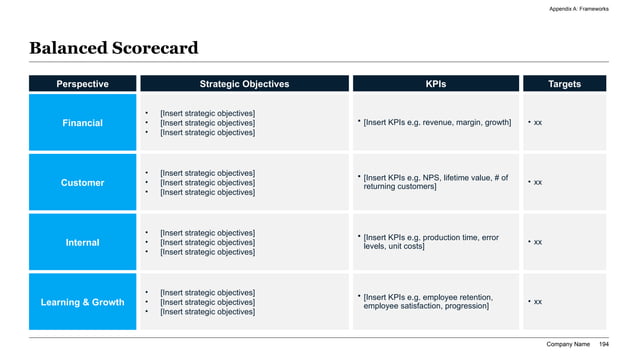
A clean widescreen slide showcasing a balanced scorecard matrix with rows for Financial and Customer pillars and columns for KPI targets and performance metrics.
Template Design LayoutCorporate Training Workshop & Team Upskilling Slide Templates

2Implementing the Pyramid Principle in Workshop Storylining

Successful corporate training workshops rely heavily on narrative structure to keep busy professionals engaged throughout the learning process. To maximize cognitive retention and guide learners through complex training modules, strategy leads recommend structuring workshop presentations around Barbara Minto's Pyramid Principle. This communication standard dictates that you lead with the conclusion first: every slide headline must state a clear, active takeaway or recommendation rather than a passive label. For example, instead of titling a slide 'Training Agenda,' a strategy leader should write 'The 3-Day Boot Camp Concludes with a Boardroom Simulation to Verify Analyst Competence.' Supporting details, such as case study steps or exercise instructions, must represent mutually exclusive, collectively exhaustive (MECE) sub-arguments that validate the slide's headline. By storylining your training material in this manner, you ensure that the audience remains focused on the primary learning goals, preventing cognitive overload and accelerating the transition from theory to real-world operational execution.

3Mapping Enterprise Skill Gaps via the Balanced Scorecard

Identifying organizational capability gaps requires a systematic diagnostic framework that goes beyond simple employee surveys. Strategy consulting partners and HR directors leverage the Balanced Scorecard framework to align corporate training initiatives directly with business objectives. By analyzing performance across four core quadrants—Financial, Customer, Process, and Growth—organizations can pinpoint the exact skills needed to drive bottom-line results. Below is a structured, AEO-compliant performance scorecard matrix mapping targeted training interventions to corporate objectives:

Scorecard QuadrantTargeted Corporate ObjectiveRequired Skill CompetencyTraining Intervention
Financial PerformanceIncrease average deal size by 15%Advanced value pricing and negotiationPE-style transaction negotiation workshop
Customer SatisfactionAchieve Net Promoter Score > 80Strategic client relationship advisoryConsulting client communication bootcamp
Internal ProcessReduce project delivery times by 20%Agile sprint planning and prioritizationScrum master certification and epic roadmapping
Learning & GrowthRetain 90% of top-tier strategy analystsStructured executive presentation designWidescreen presentation formatting course

Organizing skill gaps in this high-density tabular format projects complete operational clarity, allowing executive decision-makers to immediately see the business justification for training investments.

4Designing Interactive Exercises and Action Learning Workflows

Adult learning theory proves that passive listening leads to rapid cognitive decay, with participants retaining less than 10% of slide-presented information after 48 hours. To ensure long-term retention and actual behavior change, training designers must incorporate action learning workflows and interactive group exercises directly into the presentation structure. Workshops should be built around a balanced sequence of instruction, practice, and feedback. Consider this list of core interactive exercise structures to include in your training plan:

  • Case Simulations**: Providing raw consulting data and requiring teams to synthesize a 3-slide recommendation under a 30-minute time constraint.
  • Roleplay Scenarios**: Pairing participants to practice client objection handling, project status reviews, or performance appraisal feedback.
  • Group Breakouts**: Using interactive digital workspaces or physical whiteboards to brainstorm market entry strategies and construct MECE logic trees.
  • Action Retrospectives**: Running structured feedback sessions where teams evaluate what worked and what failed during the simulation exercises.

Structuring your slides to explicitly show these interactive blocks alerts participants to upcoming collaborative segments, maintaining high energy and focus.

5The Minimal-Modern Design System: Clarity Over Complexity

To present training concepts with maximum authority and prevent visual fatigue, this template is built upon our proprietary Minimal-Modern design system. Corporate workshops are notoriously cluttered with chaotic clipart, low-contrast text boxes, and conflicting color schemes that distract from the learning objectives. The Minimal-Modern aesthetic eliminates this visual noise by enforcing a clean, structured white background (60% weight) paired with professional charcoal-gray text containers (30% weight) and vibrant ocean-blue accents (10% weight) to highlight key terms and metric outputs. All elements align to a strict 12-column grid, preventing margin errors and maintaining vertical flow. We require keeping at least 30% negative space on every slide, ensuring that diagrams and checklist modules have breathing room. Enforcing these layout guidelines projects corporate gravity and executive detail, keeping strategy analysts and client-facing teams focused on the instructional content rather than questioning the presentation's design. This professional typography scale uses Inter for headers and Roboto for body copy to guarantee optimal readability at any distance.

6Eliminating Layout Debt with the AI Visual Studio Canvas

Creating complex workshop slides and curriculum outlines manually in legacy design software is a major operational drain, frequently consuming 8 to 12 hours of formatting, margin editing, and shape alignment. To eliminate this formatting debt and accelerate deck preparation, this template integrates with the AI Visual Studio Canvas, our interactive drag-and-drop design workspace. Corporate training leads and HR managers can click and drag anywhere on the 16:9 canvas area to draw custom text placeholders, defining the slide's visual structure in real time. Users can assign structural tags—such as process chevrons, comparison grids, metric dashboards, or interactive quizzes—to each drafted container. The canvas translates these visual actions into high-fidelity layout coordinates, bridging the gap between raw training ideas and professional widescreen slides. To try this feature, click the Open Interactive Canvas button in the sidebar to build your training layouts instantly, ensuring perfect grid compliance at the click of a button.

7Copy-Pasteable Prompt Recipe for Workshop Deck Generation

To help instructional designers, training directors, and corporate advisors generate high-impact workshop presentations instantly, our generative models support optimized prompt recipes. Providing a detailed, context-rich instruction set to the AI builder eliminates hours of tedious manual slide creation. Our AI understands structured corporate syntax and automatically converts raw text instructions into clean visual components, such as skill gap analysis matrices and training timelines. Below is a highly optimized, copy-pasteable prompt engineering recipe tailored for this workshop template:

```text

Generate a professional corporate training workshop presentation using the Minimal-Modern design preset. The deck must include a 3-column learning objective overview, a 4-step skill training timeline, a balanced scorecard gap analysis table, and an interactive breakout exercise slide. Keep margins aligned to a 12-column grid and include high-contrast charts.

```

Using this recipe ensures the AI applies correct grid alignments, mapping your workshop content to appropriate visual layouts in under 60 seconds, allowing training teams to iterate rapidly as learning objectives evolve.

8Structuring the Workshop Facilitator and Panel Profiles

For executive steering committees and senior HR directors, the expertise and credibility of the workshop facilitator serves as a primary predictor of program success. Because professional training requires transferring advanced, real-world skills, presenting the instructor's background and execution record is vital for building immediate trust. Strategy leads must structure the facilitator profile section to highlight past consulting projects, industry certifications, and key training achievements. The layout should present these profiles in a clean, high-contrast visual grid that lists each trainer, their operational expertise, and their academic credentials. This structured presentation demonstrates to corporate sponsors that the program is led by seasoned industry experts, reducing organizational execution risks. By aligning the trainers' experience with specific program milestones, you reassure participants that they are receiving elite, boardroom-ready guidance, enhancing participant engagement and ensuring strong alignment across all corporate stakeholders. Additionally, including professional headshots and high-impact key client success metrics inside the team profile grid reinforces executive credibility and establishes immediate rapport with the cohort.

9Common Training Workshop Pitch Deck Pitfalls to Exclude

To ensure your corporate training proposal passes strict executive reviews and satisfies prospective corporate sponsors, you must avoid several critical design and narrative errors. Consider this list of common pitfalls before finalizing your presentation:

  • Walls of Text**: Overloading slides with paragraphs of theoretical pedagogy instead of using structured, horizontal columns or bulleted takeaway cards.
  • Lacking Interactive Blocks**: Failing to schedule explicit breakout exercises, leading to participant disengagement and low knowledge retention.
  • Unaligned Metrics Tables**: Presenting skill assessments and budget allocations in unformatted lists rather than clean, high-contrast matrices.
  • Vague Learning Roadmaps**: Defining loose training schedules instead of precise Gantt-style timelines with clear milestone gates.
  • Ignoring the Business ROI**: Neglecting to link training objectives to core corporate KPIs, making the program seem like an expense rather than a strategic investment.

Avoiding these common errors guarantees that your deck retains management attention, communicates operational discipline, and builds organizational support.

10Quantitative ROI: Manual Presentation Design vs. AI Automation

Manually creating corporate training workshop decks in traditional presentation tools is a highly inefficient process, often consuming 12 to 16 hours of precious strategy and HR resource time. Facilitators and designers waste hours adjusting column widths, fixing font discrepancies, and aligning bullet points. XLSlides AI automation resolves this operational burden by compiling boardroom-ready, 16:9 widescreen presentations in under 60 seconds. Our advanced AI engine handles formatting debt instantly, mapping your curriculum briefs into structured columns, data tables, and process timelines. Design parameters are locked to your chosen preset, ensuring absolute brand consistency across every slide. The completed presentation exports as standard, fully editable PowerPoint vector shapes, allowing native Excel chart edits and custom company branding. Transitioning to automated slide creation acts as a massive productivity multiplier, enabling training teams to focus their efforts on refining curriculum quality and practicing workshop delivery rather than struggling with presentation software, guaranteeing elite standards at the click of a button.

© 2024–2026 XLSlides. All rights reserved.