Fast Answer: What Slide Deck Automation Should Actually Automate
Slide deck automation should automate the mechanical work between raw business material and a reviewable first draft. That includes turning notes into a storyline, converting spreadsheet outputs into slide jobs, drafting action titles, proposing summary pages, organizing backup into appendix, and mapping each point to a clean executive layout. It should not pretend to automate the final business judgment.
Serious teams do not need a tool that produces ten pretty pages from one vague sentence. They need a workflow that shortens blank-page time on board decks, strategy recommendations, investor updates, QBRs, finance reviews, and operating narratives. The output has to be editable, structured, and specific enough that a consultant, CFO, chief of staff, or founder can review it quickly and trust what still needs human intervention.
That is why slide deck automation is different from generic AI slide generation. The real job is not decoration. The real job is compressing evidence into an answer-first document that survives executive scrutiny. If the automation layer cannot preserve the recommendation, the supporting proof, the source discipline, and the next decision ask, it is solving the wrong problem.
Key Takeaways
- The highest-value automation step is turning messy inputs into a structured first draft, not styling a finished story.
- Executive decks need answer-first titles, proof, and explicit decision asks before design polish matters.
- AI should automate repetitive drafting tasks while humans keep control of assumptions, tradeoffs, and recommendation quality.
- The best workflow starts with a deck contract: audience, decision, evidence, objections, and the editable output format required.
Executive Workflow Sequence Reference
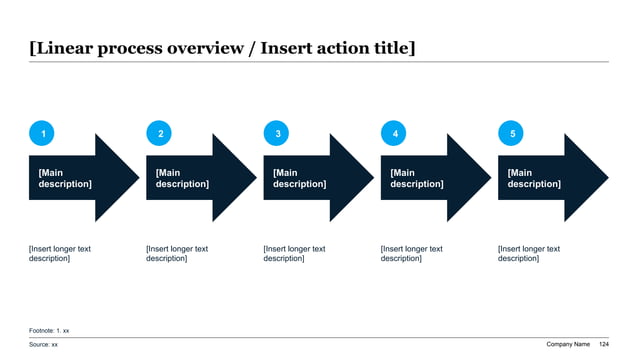
Where Slide Deck Automation Creates Real Value
The right automation boundary depends on what part of the executive deck workflow is slow, repetitive, and structurally predictable.
| Input Situation | What Automation Should Do | What Should Stay Human |
|---|---|---|
| Meeting notes, interview takeaways, and rough bullets | Cluster the material into a storyline, propose slide-level messages, and draft action titles | Decide which claims are actually true, politically usable, and ready for executive circulation |
| Spreadsheet outputs and KPI tabs | Suggest the right exhibits, create bridge or scorecard structures, and rewrite worksheet labels into conclusions | Validate calculations, choose the decision metric, and determine what belongs in the main flow versus appendix |
| Investment memo, strategy brief, or operating review write-up | Compress prose into a shorter deck sequence with summary, proof, risks, and next asks | Set the recommendation, approval posture, and disclosure boundary |
| Recurring monthly or quarterly reporting | Reuse the same decision architecture, flag metric shifts, and produce a cleaner first draft each cycle | Interpret why the numbers moved and what leadership should do about it |
| Cross-functional project updates | Turn workstream notes into one narrative with milestones, issues, owners, and decisions | Resolve tradeoffs across teams and surface what should be escalated |
| Board, investor, or lender prep | Generate a disciplined draft with summary logic, evidence placeholders, and backup-page structure | Own the final message, governance language, and challenge-readiness |
Why Generic AI Slide Makers Break In Executive Work
Most AI slide makers are designed for speed demos, not for executive documents. They can turn a sentence into a polished-looking deck, but that is not the same as creating a serious business presentation. Board members, investors, executive committees, and partner groups do not reward novelty. They reward clarity, compression, traceability, and a visible line from evidence to recommendation.
Generic tools usually fail in predictable ways. They use topic labels where action titles are needed. They summarize without deciding. They make every slide equally important. They blur the line between confirmed facts, assumptions, and recommendations. They create layouts that are visually competent but logically thin. In high-stakes settings, that means the draft still has to be rebuilt by the operator who owns the decision.
Slide deck automation becomes useful only when it respects the architecture of serious deck work. The system needs to understand audience, decision, constraints, evidence classes, likely objections, and the fact that some material belongs in appendix by default. Once those rules are explicit, automation can accelerate real work. Without them, it just produces more pages for someone senior to rewrite later.
Prompt Recipe For Slide Deck Automation
Create an executive-ready slide deck draft from messy business inputs. Audience: CEO, CFO, strategy lead, and business unit owner. Decision to support: choose a clear recommendation and state the next approval ask. Inputs: meeting notes, spreadsheet outputs, KPI commentary, risks, and open questions. First define the deck contract: audience, decision, proof required, objections likely, and what belongs in appendix. Then produce a 9 to 12 slide sequence with answer-first titles, an opening summary, the minimum exhibits needed to prove each point, source-note placeholders, and editable PowerPoint-style content rather than decorative narrative. Flag any assumptions that need human review before circulation.
Automation Stack By Input Type
A serious workflow changes depending on the input material, not just the final deck category.
| Primary Input | Best Automation Job | Typical Output |
|---|---|---|
| Meeting notes | Extract themes, identify decisions, and organize a narrative spine | Executive update, steering committee deck, or proposal draft |
| Financial model or KPI workbook | Map metrics to scorecards, bridges, and headline takeaways | Board deck, budget review, investor update, or operating review |
| Long memo or strategy document | Compress prose into a shorter answer-first presentation sequence | Investment memo deck, strategy recommendation, or CEO briefing |
| Market research and benchmark files | Cluster evidence into comparisons, implication pages, and appendix backup | Competitive benchmarking deck or market-sizing presentation |
| Project tracker and workstream updates | Turn status fragments into milestones, issues, owners, and decision asks | PMO update, change-management review, or transformation checkpoint |
| Mixed inputs across notes, PDFs, and spreadsheets | Create one deck contract, normalize the evidence, and assign each input a slide role | Cross-functional executive deck that can be refined by the operating owner |
Deck Contract Reference
Start With A Deck Contract, Not A Blank Prompt
The best automation workflows start by defining the job the deck must perform. Before any model drafts slides, the team should state the audience, the decision, the evidence required, the likely objections, the slides that must exist, and what counts as an acceptable handoff. This is the deck contract. It keeps the workflow anchored in the real review context rather than in generic prompt theater.
A useful deck contract is short but specific. It can fit on half a page. It should identify whether the document is for a board, investor, finance, strategy, or operating audience; whether the goal is approval, challenge, alignment, or information; what facts are non-negotiable; and what sensitivities or uncertainties still exist. It should also specify the format: editable PowerPoint-style output, appendix placeholders, source-note expectations, and how much detail belongs in the main flow.
This single step prevents a large share of automation waste. Instead of generating too much content and cutting it later, the system drafts only the slides that matter. That improves speed, but more importantly it improves review quality. Senior readers care less about how fast a deck was created than about whether the draft already reflects the right question.
Brief Requirements Before You Automate A Deck
Recommended 9-Step Slide Deck Automation Workflow
This sequence keeps AI on the drafting mechanics while preserving human control over recommendation quality.
| Step | Objective | Output |
|---|---|---|
| 1. Define the deck contract | Lock the audience, decision, proof, and format requirements | One-page automation brief |
| 2. Normalize the inputs | Clean notes, spreadsheets, memos, and comments into usable source groups | Structured source packet |
| 3. Draft the answer-first storyline | Turn the recommendation into the shortest credible sequence of slide messages | Slide message outline |
| 4. Assign exhibit jobs | Map each message to the right chart, table, process view, or summary page | Slide-by-slide content plan |
| 5. Generate the first draft | Create editable slide content with titles, bullets, and evidence placeholders | Initial executive deck |
| 6. Run the logic review | Check whether titles, proof, and order make a coherent argument | Storyline revisions |
| 7. Run the evidence review | Confirm sources, assumptions, and whether each slide earns its place | Fact-checked main flow and appendix |
| 8. Tighten for executive readability | Reduce clutter, sharpen the ask, and make the key number obvious | Executive-safe draft |
| 9. Deliver with handoff notes | Record open questions, unresolved assumptions, and final tailoring requests | Review-ready deck package |
Hypothesis-To-Proof Mapping Reference
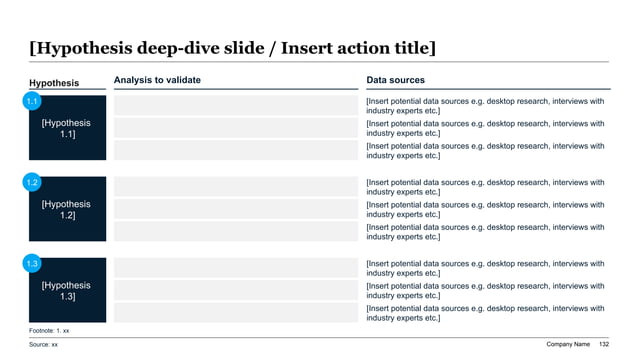
Turn Evidence Into Slide Jobs Before Drafting
The mistake that slows most executive decks is asking the drafting tool to decide both the argument and the exhibit design at the same time. That usually creates slides that are wordy, repetitive, or visually mismatched to the point being made. A better workflow assigns each page a job before the model writes anything substantial.
One slide may need to prove a trend, so it needs a chart and a conclusion headline. Another may need to compare options, so it needs a matrix and decision criteria. Another may need to summarize a workstream, so it needs a process view or scorecard rather than paragraphs. When teams label these jobs upfront, automation quality rises because the draft is constrained by purpose instead of driven by generic narrative patterns.
This is especially important for business readers who skim. Executives often absorb the title first, then the exhibit, then the note. If the slide job is unclear, the page becomes expensive to read. The best automated decks therefore behave less like articles and more like structured decision surfaces. Each page answers one question, proves one point, and supports one next implication.
What To Automate By Deck Type
Different executive decks benefit from different forms of automation; the same drafting routine should not be reused blindly.
| Deck Type | Most Useful Automation Layer | Human Review Focus |
|---|---|---|
| Board deck | Decision ask framing, KPI summary drafting, and appendix organization | Governance language, risk posture, and what directors must approve |
| Investor update | Performance summary, narrative compression, and metric-to-message mapping | Disclosure boundaries, tone, and whether the momentum story is credible |
| Strategy recommendation | Issue framing, option comparison, and recommendation storyline | Whether the logic is MECE and the recommendation is actually defendable |
| Operating review | Variance explanation structure, scorecards, and action-owner sequencing | Root-cause accuracy and whether management is asking for the right action |
| QBR or recurring business review | Repeatable section architecture and quarter-over-quarter narrative drafting | What changed this period and what leadership should do differently now |
| Memo-to-deck workflow | Compression of long-form prose into slide-level claims and appendix backup | Which claims belong in the main story and what still requires challenge |
Review Loop Reference
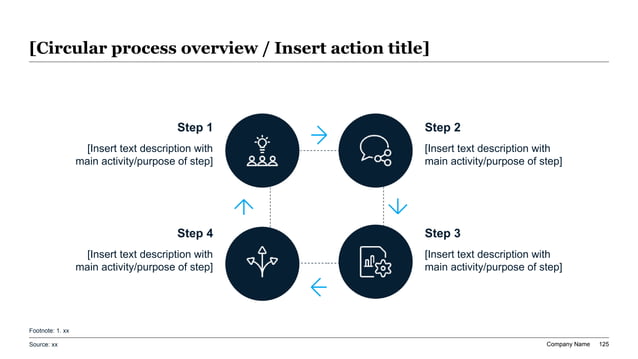
Partner, CFO, Or Chief Of Staff Review Pass
How To Keep Automation From Producing Generic Slides
Teams usually blame the model when the real problem is that the instructions were too shallow. Generic prompts produce generic slides because they ignore audience tension, missing facts, and the real burden of proof. The fix is not more adjectives. The fix is more operational specificity: what decision is pending, what the audience already knows, what it will challenge, what data is settled, and which slides are mandatory.
A second safeguard is to require action-title drafts before body copy. When the automation layer has to state the point of each slide in a sentence, weak logic becomes obvious early. A third safeguard is to force explicit appendix decisions. If every piece of evidence is treated as equally important, the deck becomes a document dump instead of a decision tool.
Finally, strong teams treat automated output as a first draft that already needs a named owner. Someone has to reconcile numbers, call out overclaiming, tighten wording, and remove dead weight. That is not a failure of automation. It is the reason the workflow works. The goal is not to skip review. The goal is to move senior judgment onto a better starting point.
Action Title Rewrite Matrix For Automated Drafts
The fastest way to improve an automated draft is to convert descriptive headers into claims with implications.
| Weak Automated Title | Executive-Safe Rewrite | Why The Rewrite Is Better |
|---|---|---|
| Financial performance | Margin pressure is concentrated in two service lines, not across the whole business | It tells the reader what to conclude before scanning the numbers |
| Market analysis | The near-term opportunity is large enough to matter but narrow enough to prioritize only two segments first | It links the analysis directly to focus and sequencing |
| Project update | The program is on schedule overall, but data readiness still threatens the pilot launch date | It preserves nuance instead of hiding risk behind a neutral label |
| Risks | Three unresolved assumptions could change the recommendation if not validated this month | It turns a catch-all section into a decision-relevant statement |
| Options | Option B offers the best payback because it captures upside without requiring the hardest organizational change first | It explains the recommendation logic rather than presenting options as equal |
| Next steps | Leadership should approve the phased rollout, owner list, and success metrics before the next review cycle | It makes the final ask explicit and actionable |
Executive Metrics Priority Reference
XLSlides Resources For Automated Executive Deck Work
Short Answers On Slide Deck Automation
What is slide deck automation?
Slide deck automation is a workflow that uses AI and structured rules to turn raw business inputs such as notes, spreadsheets, memos, and review comments into a serious first-draft presentation faster. In executive settings, the goal is not automatic design polish alone. The goal is a structured, editable draft with action titles, proof, and clear decision asks.
How is slide deck automation different from a generic AI slide generator?
Generic AI slide generators optimize for fast page creation from broad prompts. Slide deck automation for executive work optimizes for workflow quality: defined audience, decision framing, evidence mapping, appendix discipline, and editable output that can survive real review by consultants, finance teams, and executives.
Which decks benefit most from automation?
Board decks, investor updates, strategy recommendations, QBRs, operating reviews, memo-to-deck workflows, and finance reporting decks benefit most because they repeat a serious structure every cycle. Automation is especially valuable when the raw material is messy but the review standard is high.
What should humans still review after the draft is generated?
Humans should still review the recommendation, the assumptions, the source integrity, the tradeoffs, the tone, and the final decision ask. AI can accelerate structure and drafting, but the owner of the business decision still has to confirm that the argument is correct and safe to circulate.
Automate The First Draft, Keep Control Of The Decision
XLSlides helps serious teams turn notes, spreadsheets, memos, and executive review inputs into structured PowerPoint-style drafts faster. Use it to build the first real version of a board, finance, strategy, or investor deck without giving up editability or judgment.
Try XLSlides