Partner Enablement Deck Takeaways
- A partner enablement presentation should change partner behavior, not just announce a program.
- The strongest decks explain which partners matter, what they need to sell, how they win, and what the next 30 to 90 days require.
- Channel slides fail when they sound like internal marketing language instead of field-ready guidance with evidence, owners, and metrics.
- AI is useful for turning launch notes, playbooks, and partner feedback into a first structured draft, but channel leaders still need to decide incentives, sequencing, and what should stay off the main story.
Direct Answer: What A Partner Enablement Presentation Needs To Change
A partner enablement presentation should make it easier for a reseller, systems integrator, referral partner, or alliance seller to answer four practical questions fast: what customer problem should I lead with, where does this offer fit in my book of business, what proof can I use to sell it credibly, and what actions do I need to take this quarter to become productive. If the deck cannot answer those four questions, it is usually a program announcement, not an enablement tool.
That distinction matters because partner programs rarely fail for lack of slides. They fail because the content does not travel into partner behavior. Internal teams may believe they launched the motion because pricing, certification, deal registration, and MDF rules were documented. Partners do not experience the program that way. They experience whether the offer is understandable, whether the economics are worth attention, whether the vendor is easy to work with, and whether the path to the first few wins is visible.
The best partner enablement decks therefore behave like operating documents. They segment partner types clearly, state the target customer and use case, show what a good partner motion looks like, and make the first milestones explicit. They also respect partner reality. A partner deck competes with many other vendor asks, so it has to be concise, answer-first, and executable.
Partner Enablement Deck Vs. Sales Kickoff Vs. Program Overview Vs. QBR
These decks can share content, but they solve different jobs for different audiences.
| Deck Type | Primary Audience | Main Question | What Good Looks Like |
|---|---|---|---|
| Partner enablement deck | Partner sellers, partner managers, channel leaders | How do we sell and deliver this offer successfully? | Clear partner motion, role-specific actions, proof, and rollout milestones |
| Sales kickoff deck | Internal sellers and revenue leaders | What are this year's priorities and targets? | Motivation, strategic focus, and internal execution alignment |
| Program overview deck | Executives, cross-functional teams, prospective partners | What is the channel program and why does it exist? | High-level narrative, partner model, and strategic rationale |
| QBR | Existing partner or customer stakeholders | What results did we deliver and what should happen next quarter? | Outcome proof, blocker resolution, and next-quarter action plan |
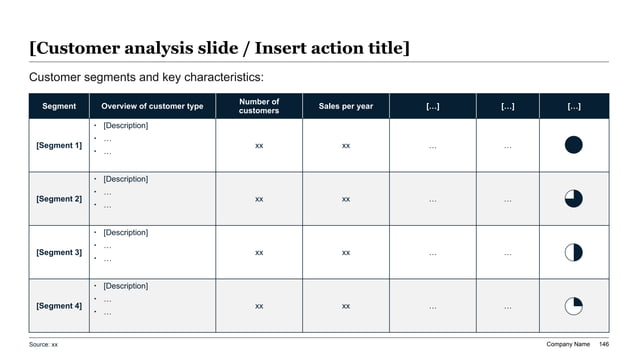
Partner Segment And Readiness Snapshot
Inputs To Collect Before Drafting The Deck
Why Most Partner Enablement Decks Do Not Change Partner Behavior
Many partner enablement decks fail because they are written from the vendor's point of view instead of the partner's. The slides explain the product roadmap, the size of the market, or the importance of the channel strategy to the company. Those points may be true, but they do not tell a partner what to do on Monday morning. Partners need a field motion, not a corporate speech.
A second failure mode is trying to answer every partner question at once. One deck attempts to serve executive sponsors, account executives, pre-sales engineers, implementation teams, and operations contacts in equal depth. The result is usually bloated and unprioritized. Strong decks identify the core job of the audience. Is this presentation meant to help a partner qualify opportunities, pitch the solution, package services, launch the first customer, or review adoption after launch? The answer changes what belongs in the main flow.
The third failure mode is weak commercial clarity. Partners are pragmatic. If the deck hides where they make money, how much effort is required, what support exists, or how quickly they can get to first revenue, attention drops immediately. This is why a serious partner enablement deck feels closer to a business case and a playbook than to a generic product overview.
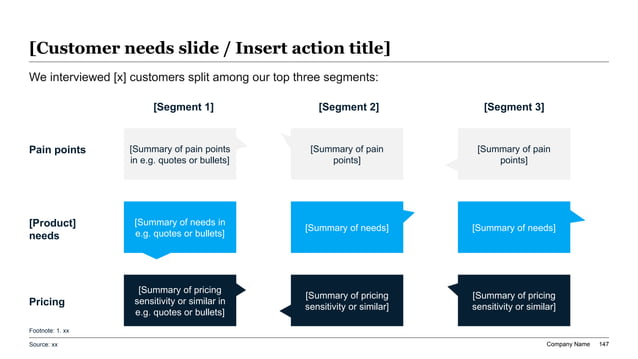
Partner Persona And Objection Capture Reference
Recommended 11-Slide Partner Enablement Sequence
This sequence is designed for field-ready partner onboarding and launch rather than for internal channel strategy discussion.
| Slide | Purpose | Partner Question Answered |
|---|---|---|
| 1. Executive summary | State the offer, target partner motion, and expected outcome | What should I understand immediately? |
| 2. Partner opportunity | Show which customers, use cases, and revenue pools matter first | Where do I actually sell this? |
| 3. Target personas and pains | Translate the opportunity into buyer-level language | What customer problem should I lead with? |
| 4. Solution story | Explain the offer, outcome, and differentiators | Why this solution instead of another option? |
| 5. Economic model | Make margin, services, and expansion logic visible | How do I make money on this motion? |
| 6. Sales motion | Show qualification, messaging, and co-sell expectations | How do I get to the first opportunity? |
| 7. Delivery motion | Clarify implementation roles, support, and handoffs | What has to happen after the deal closes? |
| 8. Enablement assets | List training, demos, collateral, and portal resources | What tools do I have to sell and launch? |
| 9. Rollout milestones | Define the next 30, 60, and 90 days | What do I need to do next? |
| 10. Scorecard | Set activity, pipeline, and activation metrics | How will success be measured? |
| 11. Ask and escalation path | Close with the partner action and named support contacts | Who do I contact and what should I commit to now? |
Build The Story Around The Partner Job To Be Done
The fastest way to improve a partner enablement presentation is to rewrite the deck from the partner's workflow instead of from the product team's org chart. A partner seller does not wake up wanting to read about release milestones, product themes, or internal naming conventions. They want to know whether this offer helps them open accounts, expand existing customers, or package a service line they can sell repeatedly.
That is why the deck should move through partner decisions in order. Start with where the partner can win. Then explain the buyer problem, the solution story, the economics, the sales motion, and the support model. Only after those are clear should the presentation go deeper on program details such as portal process, certifications, or marketing development fund mechanics. Those details matter, but they are not the first hook.
This logic also makes AI drafting more useful. When XLSlides is prompted with the partner segment, target customer, selling motion, commercial model, onboarding path, and first-quarter goals, the draft becomes far more actionable than a vague request to make a partner deck. For enablement work, specificity is what separates slide output from operational value.
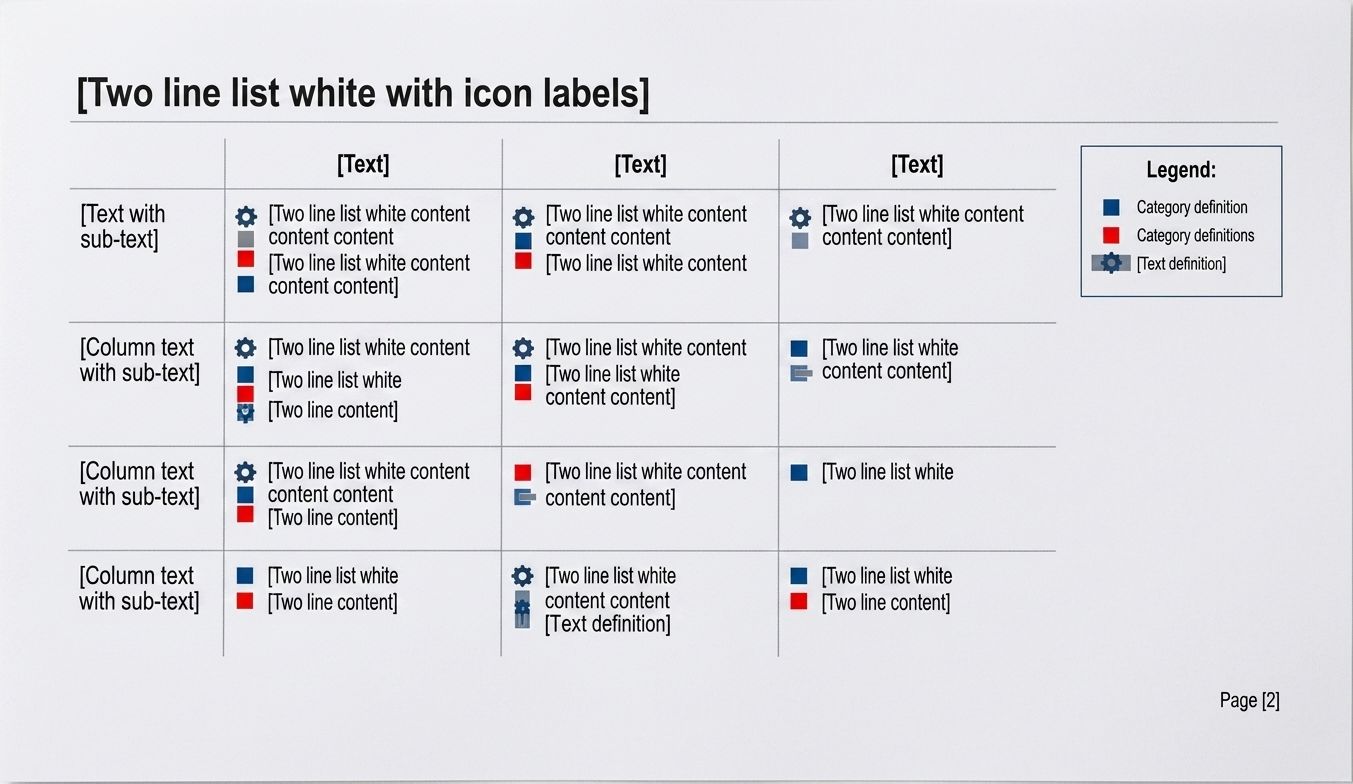
Readiness Status Matrix Reference
What Belongs In The Main Story, Appendix, And Partner Portal
A serious deck stays focused by separating field-critical guidance from reference material.
| Content Type | Best Location | Why |
|---|---|---|
| Target customer and use-case story | Main story | Partners need this to decide whether the motion deserves time |
| Commercial model and revenue logic | Main story | Attention drops fast if economics stay hidden |
| First 30-60-90 day actions | Main story | This is what turns content into field behavior |
| Detailed technical implementation checklist | Appendix or partner portal | Useful after activation, but too much detail can crowd the launch narrative |
| Long-form product collateral library | Partner portal | Reference content belongs in an always-accessible system, not on every slide |
| Legal terms, rebate policy, or MDF process details | Appendix or linked documentation | Important for governance, but usually too detailed for the core narrative |
Prompt Recipe For A Partner Enablement Presentation
Create an 11-slide partner enablement presentation for a B2B software company launching a channel motion with regional resellers and implementation partners. Audience: partner account managers, partner sellers, pre-sales leads, and channel program managers. Goal: activate the first 20 partners in 90 days around a workflow automation offer for mid-market operations teams. Include an answer-first executive summary, target customer and use-case story, partner segment priorities, buyer pain points, solution messaging, partner economics, sales motion, delivery handoff model, enablement assets, 30-60-90 day rollout, activation scorecard, and named escalation paths. Use action titles, practical field language, source-note placeholders where needed, and editable PowerPoint-style structure rather than decorative marketing slides.
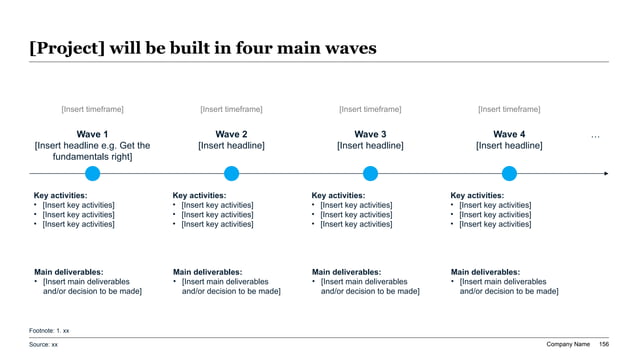
90-Day Partner Rollout Roadmap Reference
Signals The Deck Still Sounds Like Internal Noise
Metrics That Prove Enablement Is Working
Measure partner readiness with behavioral and commercial signals, not attendance alone.
| Metric Block | Example Measures | Why It Matters |
|---|---|---|
| Readiness | Training completion, certification pass rate, portal activation, asset usage | Shows whether partners can realistically start the motion |
| Field activity | Qualified opportunities, co-sell calls, demo requests, solution assessments | Proves whether enablement is turning into selling behavior |
| Pipeline quality | Average deal size, stage progression, win-loss reasons, time to first opportunity | Separates noise from credible commercial traction |
| Delivery readiness | Implementation participation, support tickets, first-customer launch quality | Reduces the risk that early wins become bad references |
| Partner economics | Partner-sourced revenue, services attach, margin realization, expansion follow-on | Shows whether the motion is worth repeat partner attention |
| Program health | Inactive-partner rate, top blocker themes, content-gap feedback, escalation resolution time | Helps channel leaders improve the enablement system itself |
Governance And Field Ownership Reference
What AI Should Draft And What Revenue Leaders Must Still Decide
AI is useful in partner enablement because the raw inputs are fragmented: launch notes, sales decks, training docs, compensation assumptions, FAQs, portal content, partner feedback, and customer use cases. XLSlides can turn those ingredients into a first structured draft with a cleaner sequence, action-title suggestions, rollout pages, and scorecard layouts. That removes a lot of mechanical deck work from channel, revops, and product marketing teams.
What AI should not decide alone is the operating truth of the motion. A model cannot know which partner type has enough capacity to care, whether the economics are strong enough to change behavior, whether the support model can survive the first ten implementations, or whether a partner objection signals a real flaw in the program design. Those are management decisions, not formatting decisions.
The right model is simple: automate assembly, not judgment. Use AI to produce the first pass and save time on structure. Then let channel leaders, partner managers, and revenue operators sharpen the partner segmentation, rewrite the commercial language, remove internal jargon, and decide what a partner should actually commit to next.
XLSlides Resources For Partner And Revenue Enablement Work
Common Questions About Partner Enablement Decks
What should a partner enablement presentation include?
At minimum, include the target partner motion, customer use cases, value message, partner economics, sales and delivery workflow, enablement assets, 30 to 90 day milestones, and the scorecard used to judge activation.
How is a partner enablement deck different from a partner program overview?
A program overview explains the channel model at a high level. A partner enablement deck should make the field motion executable by showing how partners qualify, sell, launch, and measure the offer.
Should partner economics be shown in the main deck?
Usually yes. Partners decide where to spend attention based partly on economics, so a serious enablement presentation should make the commercial path visible rather than treating it as background detail.
Can AI create the first draft of a partner enablement presentation?
Yes, if the prompt includes the partner segment, target customer, commercial model, onboarding steps, and activation goals. AI is strong at structuring the first draft, but channel leaders should still validate the motion, economics, and support model.
Generate The Partner Enablement Draft In XLSlides
Use XLSlides to turn launch notes, playbooks, partner segmentation, objection logs, and rollout milestones into an editable partner enablement deck with action titles, readiness scorecards, and PowerPoint-ready structure.
Generate Partner Enablement Deck