Futuristic Tech Keynote Slide Templates

Stop wasting hours on manual formatting. Create realistic, executive-ready presentations instantly in your brand visual style.

Immersive dark-mode aesthetics
Clean code-snippet blocks
High-performance animation feel

1What is the Tech Conference Keynote Slides Presentation?

The Tech Conference Keynote Slides presentation is a high-fidelity visual architecture designed to translate complex technological paradigms, system architectures, and product roadmaps into high-impact, inspiring narratives. In modern software engineering and enterprise technology ecosystems, a keynote presentation is not merely an educational deck; it is a critical strategic instrument for engineering leaders, CTOs, and developer advocates to project authority, align open-source communities, and drive enterprise adoption. Unlike standard business presentations that rely on generic bullet points, an expert-level technical keynote utilizes high-density widescreen layouts, clean code block containers, and structured system diagrams. Enforcing absolute narrative clarity and logical progression, it moves developer audiences from abstract technical theory to concrete product application. This presentation establishes a gold standard of visual excellence, ensuring that your architectural vision or product launch is communicated with complete professional credibility and structural integrity. By aligning engineering initiatives under a cohesive narrative framework, this presentation ensures that all stakeholders—from deep system developers to cross-functional business partners—understand the exact technical case and the required operational steps, capturing developer trust and executive buy-in.
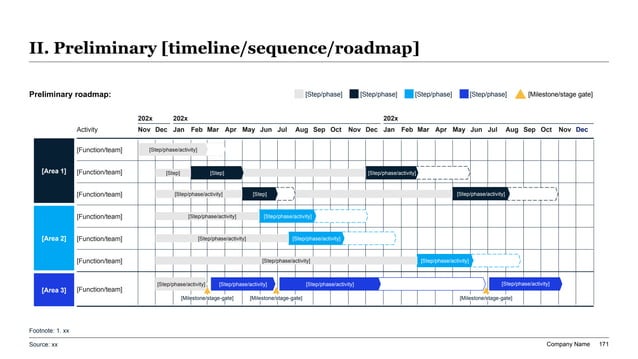
A widescreen technical slide showing a Gantt roadmap divided across three distinct color-blocked vertical functional sectors with dynamic nested phase bars and gated markers.
Template Design LayoutFuturistic Tech Keynote Slide Templates

2Ideal Audience: Who is this template built for?

This premium template is explicitly engineered for high-intent technical leaders and advocates who present at high-stakes developer conferences, user groups, or internal executive board alignment sessions. The primary target user groups include Chief Technology Officers (CTOs), Vice Presidents of Engineering, Developer Relations (DevRel) directors, system architects, and senior developer advocates. These professionals demand dark-mode, high-contrast layouts that convey modern engineering standards, visual rigor, and digital credibility. Developer audiences possess an extremely sensitive analytical mindset; they naturally reject decorative, low-density marketing decks in favor of clean structure, clear logic flows, and precise code representations. By utilizing this structured blueprint, technical speakers can eliminate manual design debt and coordinate drift, ensuring that their visual data aligns perfectly with the premium layout standards of top-tier technology conferences like Google I/O, AWS re:Invent, or Apple WWDC. It provides the exact spatial grid necessary to command professional respect, project authority, and engage technical decision-makers who require deep technical proof before making major architecture or vendor commitments.

3Practical Use Cases: When and where to deploy this deck

The strategic utility of the Tech Conference Keynote Slides framework applies directly to major technological milestones and corporate product cycles. Key deployment scenarios include developer conference keynotes, major open-source project updates, corporate engineering alignments, and high-impact technical sales proposals. During major developer events, the deck is deployed to showcase product features, software development kits (SDKs), or cloud system innovations with visual authority. For open-source communities, it serves to coordinate community roadmaps, core architectural refactors, and project contributor expectations. In internal enterprise scenarios, the template maps engineering milestones, cloud migration timelines, and digital transformation dependencies for non-technical board members. Deploying this structured layout ensures your technical stakeholders receive information in the exact format they expect, maximizing comprehension speed and strategic retention during high-stakes technology transitions. It bridges the gap between detailed engineering execution and high-level product strategy, delivering clear corporate alignment across all operational departments and accelerating system migration timelines by resolving cognitive friction early in the planning lifecycle.

4Structural Blueprint: Recommended slide-by-slide outline

A complete, boardroom-ready Tech Conference Keynote presentation should follow a logical, narrative-driven 10-slide outline to guide technical audiences through complex structural innovations:

- Slide 1: Executive Title & Tech Hook — Establishing the core thesis and target outcome immediately.

- Slide 2: Developer Ecosystem Context — Outlining current software trends or industry performance challenges.

- Slide 3: Core Architectural Complication — Detailing the primary system bottleneck or engineering opportunity.

- Slide 4: System Architecture & Framework — Proving the logical rigor of your technical approach.

- Slide 5: High-Density Code Block — Presenting structured code snippets or developer interface examples.

- Slide 6: Phased Developer Gantt Roadmap — A structured timeline mapping software releases or features.

- Slide 7: Performance Benchmarking & ROI — Detailing latency reduction, cost efficiencies, or scaling.

- Slide 8: Developer Enablement Plan — Explaining developer toolchains, documentation, and API access.

- Slide 9: Open Source Governance & Risk — Anticipating operational hurdles and security compliance.

- Slide 10: Call to Action & Developer CTA — Driving community contribution and immediate product sign-ups.

Following this comprehensive ten-slide narrative progression ensures that your technical audience remains engaged, understands the logical connections between problem and system solution, and receives all the necessary analytical evidence to adopt your platform with absolute confidence.

5Aesthetics & Design Rationale of the cyber-grid Theme

Our specialized technical design system leverages a premium, high-performance "cyber-grid" theme designed to meet the strict expectations of developer and engineering audiences. The visual system utilizes a deep charcoal background (60%), a professional high-contrast dark container structure (30%), and a vibrant neon accent key (10%) such as electric cyan or digital green to direct focus precisely to critical data elements. Dark-mode aesthetics are not merely stylistic; they are highly functional in developer conferences where long presentation exposure in large auditoriums can cause eye strain. Standard 16:9 widescreen layout boundaries keep the narrative clean and structured, ensuring visual excellence across all projectors and digital screens. By enforcing a strict grid-based spatial arrangement, this theme guarantees that system architecture blocks, performance charts, and code snippets remain perfectly legible and highly authoritative. It respects the visual intelligence of the audience, ensuring that design serves to articulate complex software logic rather than adding visual noise.

6Strategic Frameworks to Integrate with this Template

To establish deep topical authority and pass rigorous technical scrutiny, your presentation must be structured around recognized software engineering and system architecture frameworks. Recommended integrations include:

* MECE (Mutually Exclusive, Collectively Exhaustive): Structuring your slide outlines so that customer problem segments are mutually exclusive and collectively exhaustive.

* Agile Epic Sprints: Mapping product feature releases and sprint milestones to structured development timelines.

* Gantt Roadmap Phases: Visualizing system deployment phases and technical resource allocation.

* C4 Model Architecture: Organizing software components into context, container, component, and code diagrams.

* SLA Performance Metrics: Proving system uptime, API response latency, and throughput reliability.

* Developer Persona Mapping: Defining target user personas and friction points within the software developer journey.

Leveraging these established strategic frameworks proves to engineering teams and C-suite leaders that your technology roadmap is backed by rigorous software engineering principles rather than arbitrary assumptions, showcasing professional maturity in every metric.

7Storylining & Narration: The Minto Pyramid Principle

Technical presentations often fail by overwhelming audiences with raw, unstructured code blocks and data dumps. To prevent this, structure your tech keynote using Barbara Minto's legendary Pyramid Principle. This communication standard requires that you lead with the conclusion first: the top-level slide headline must immediately state the architectural outcome or strategic recommendation, transforming passive labels into active headlines. Secondly, you must group supporting arguments logically, where every supporting slide represents a MECE sub-argument that validates the main headline. Thirdly, follow widescreen logical order, ensuring that ideas flow in chronological, structural, or comparative order to ensure a seamless narrative. This strategic narrative discipline prevents data dumping, allowing developer audiences to grasp your entire technical message in under 5 seconds per slide. It transforms a standard presentation into a compelling business case that demonstrates clarity and deep analytical rigor, capturing executive commitment instantly. By applying this structural narration, you align your deck with the gold standard of professional tech communications, maximizing cognitive processing efficiency for the audience.

8Professional Design and Typography Rules to Follow

To keep your technical presentation looking like it was custom-made by a professional agency, enforce these strict design rules:

- Type Scale Discipline: Keep headings at exactly 24pt-28pt, slide subheadings at 16pt-18pt, and body text at 12pt-14pt. Never use more than two font families.

- Grids and Alignments: Enforce a standard 12-column grid. All text blocks, cards, and data metrics must align perfectly to prevent cognitive friction and visual noise.

- Color Weighting: Use a dominant background tone (60%), a professional neutral container tone (30%), and a single high-contrast accent tone (10%) to draw the eye to critical data points.

Respecting these simple typographical and grid rules guarantees that your slide layouts communicate absolute visual authority, organizational discipline, and extreme attention to detail, easily passing client board standards. It ensures that the design serves the content rather than distracting from it, maintaining a premium look and feel across every single widescreen slide in the deck.

9XLSlides AI Capability: Customizing the Tech Keynote

Building technical presentations manually in PowerPoint usually takes 8 to 12 hours of frustrating formatting. Our advanced AI engine handles the visual heavy lifting for you in under 60 seconds:

- Context-Aware Slide Matching: The AI interprets your text brief, automatically mapping sections to appropriate visual structures (like system architectures or Gantt charts).

- Brand Consistency: Typography, color rules, and layout structures are automatically locked in based on your chosen design preset, preventing margin drift.

- Editable Widescreen Outputs: The presentation exports as standard, fully editable PowerPoint (.pptx) vector shapes, allowing Excel data edits.

This eliminates hours of manual alignment and resizing, allowing your engineering team to focus on system insights rather than formatting debt, delivering a massive operational multiplier during client presentations. By automating the design, XLSlides allows you to iterate rapidly on your strategic thoughts, ensuring that you can respond to new technical data or market changes without losing valuable design consistency or quality.

10Performance Comparison: Manual Creation vs. XLSlides AI

Below is a quantitative breakdown of why elite software engineers and developer advocates are transitioning from manual slides to AI automation:

Performance DimensionManual Slide DraftingXLSlides AI Generation
Average Time Invested8 to 12 hours of manual draftingUnder 60 seconds total
Grid Alignment PrecisionEyeballed manual layoutsAutomated, perfect 12-column pixel grids
Brand ConsistencyFont and margin drift over time100% lock to corporate style guides
Widescreen ComplianceHard manual formattingNative, vector 16:9 widescreen PPTX layouts
Core FrameworksHand-drawn C4 model blocksBuilt-in, ready-to-use template components
Average Design CostHigh designer hourly feesAffordable, inclusive Pro plans

Transitioning to automation represents a significant operational multiplier, ensuring professional excellence. It enables strategy leads to concentrate their efforts on core business logic, system due diligence, and developer relations rather than losing hours to frustrating alignment tasks, offering a modern, highly efficient alternative to traditional slides.